

In today's digital landscape, building a meaningful presence on LinkedIn isn't just about showing up—it's about standing out. Professionals across industries struggle to consistently create content that resonates, drives engagement, and establishes genuine thought leadership. While numerous AI tools promise to streamline your LinkedIn strategy, most simply automate posting schedules or generate generic content that lacks your unique voice and perspective.Enter Dynal.AI—the first truly user-centric LinkedIn agent designed to bridge the gap between your expertise and impactful publishing. Unlike conventional automation tools, Dynal.AI functions as your personal content strategist, writer, and publishing assistant, adapting to your unique style, goals, and audience to help you build authentic influence without the overwhelming time investment.
What Is Dynal.AI?
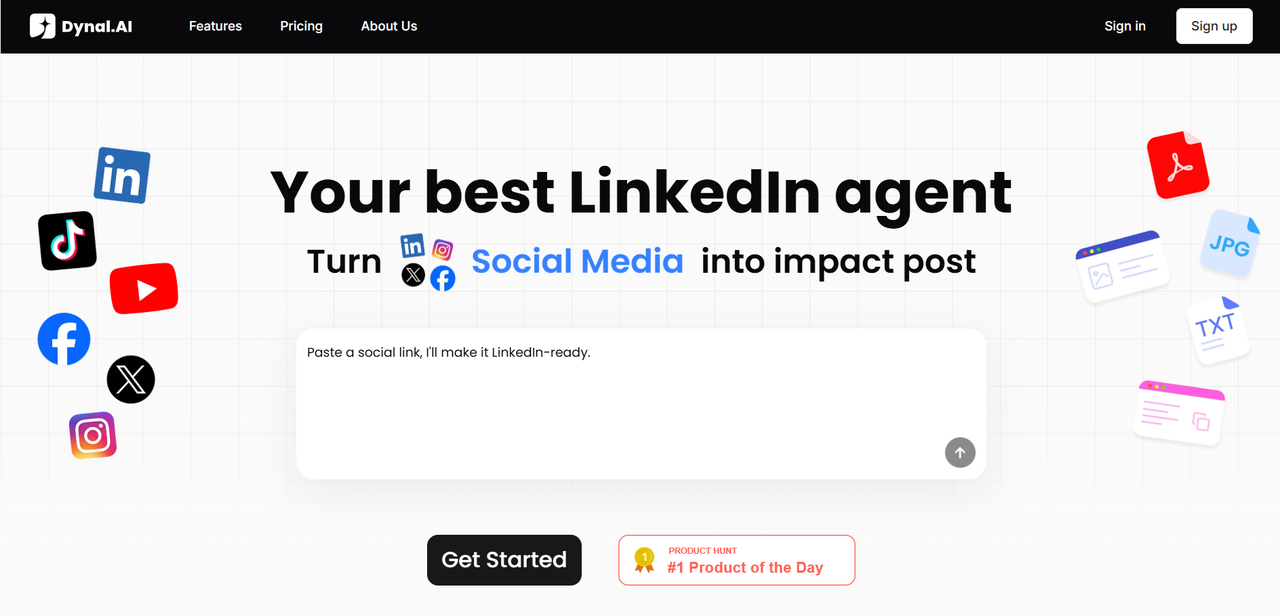
Dynal.AI is your personal LinkedIn content agent that transforms your ideas, expertise, and source materials into strategic, engagement-driving content tailored specifically to your professional voice and audience. Built for busy professionals, content creators, marketers, and founders who understand the value of LinkedIn presence but struggle to maintain consistency, Dynal.AI solves the fundamental challenge that plagues most LinkedIn users: translating knowledge and insights into compelling, polished content that actually gets noticed.
Unlike tools that simply schedule posts or generate generic content, Dynal.AI focuses on the entire content journey—from ideation and strategy to creation, refinement, and publishing—while continuously learning from your preferences and audience response.
With Dynal.AI, you can:
- Effortlessly transform ideas into standout LinkedIn posts and visuals—just upload a link, PDF, image, or text, and let our AI do the rest.
- Fine-tune every detail with flexible editing—perfect your message quickly and intuitively. You have complete control over the final draft!
- Publish in a single click—share your content instantly or schedule for later.
- Grow with transparent AI guidance—see the logic behind every recommendation and learn as you create.
Our mission is simple: empower you to build your brand, connect meaningfully, and lead on LinkedIn—without the struggle.
Key Features & Highlights
A. User-Centric Personalization
Building Your Digital Identity
The Dynal.AI experience begins with a comprehensive user profile that captures not just basic information but your unique communication style, professional goals, and audience characteristics. Through a series of strategic questions and content preferences, Dynal.AI builds a nuanced understanding of what makes your voice distinctive.
"Most AI tools treat everyone the same," explains the Dynal.AI team. "We recognized that a marketing executive, technical founder, and career coach need fundamentally different content strategies—even if they're discussing the same topics."The platform's adaptive learning system continuously refines its understanding of your preferences based on your editing decisions, feedback, and the performance of published content. This ensures that recommendations and generated content evolve alongside your professional journey.
Smart Topic Recommendations
Struggling with what to post about? Dynal.AI's topic intelligence engine analyzes trending conversations in your industry, identifies gaps in current discussions, and suggests content opportunities aligned with your expertise. The platform provides actionable prompts that spark creativity while ensuring relevance to your professional goals.
B. Powerful Content Generation
Versatile Input Processing
Dynal.AI transforms virtually any source material into LinkedIn-ready content. Simply upload links to articles, research papers, PDF reports, images, or plain text, and watch as the AI extracts key insights, supporting data, and compelling narratives.
For example, a 30-page industry report can be distilled into a series of focused LinkedIn posts that highlight the most relevant findings for your audience, complete with matching visuals and statistics.
Instant LinkedIn-Optimized Content
Within seconds of processing your source material, Dynal.AI generates complete LinkedIn posts optimized for engagement, including:
- Attention-grabbing opening hooks
- Scannable content structure with appropriate emoji use
- Strategic hashtag recommendations
- Call-to-action prompts calibrated to your goals
- Custom-designed visual elements that complement your written content
Visual Content Creation
What truly sets Dynal.AI apart is its ability to not only generate compelling post copy but also create professional, visually engaging images to accompany your content. These visuals are professionally designed with attention-grabbing colors, typography, and layouts that enhance your message and increase stopping power as users scroll through their feeds. Each template can be customized to match your brand identity and personal style.
Real-World Transformation
Consider this use case: A management consultant uploads a detailed client case study. Dynal.AI instantly extracts the key challenge, solution approach, and measurable outcomes, then transforms this information into a compelling narrative that showcases expertise without revealing confidential details. The resulting post is professional, insightful, and primed for engagement—all without spending hours on content creation. The platform simultaneously generates a complementary visual that highlights key statistics or takeaways, creating a complete LinkedIn post package.
C. Flexible Editing Experience
At Dynal.AI, we know that great content often starts with AI — but it’s your personal touch that makes it stand out. That’s why our editing interface is designed to be practical, easy to use, and empowering. You can quickly adjust tone, wording, and visuals with intuitive controls that feel natural and flexible. Rather than rigid templates, Dynal.AI offers a smooth, collaborative editing experience that helps you refine each post until it feels authentically yours.
Refine Your Draft
Dynal.AI’s modular design allows you to edit specific parts of your post independently. Want to refine your opening hook, rephrase a key point, or soften a strong CTA? Simply select the section and update it without losing your overall flow.
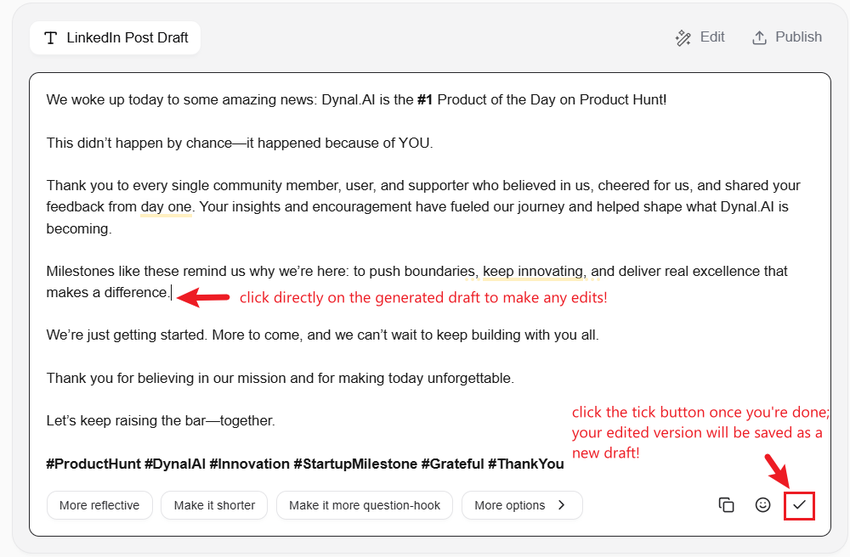
Refining your content should be fast, effortless, and insight‑driven — not a chore. With Dynal.AI, you can instantly explore different versions of your post by selecting from intelligent style and tone options such as More Reflective, More Conversational, More Professional, or More Inspirational.
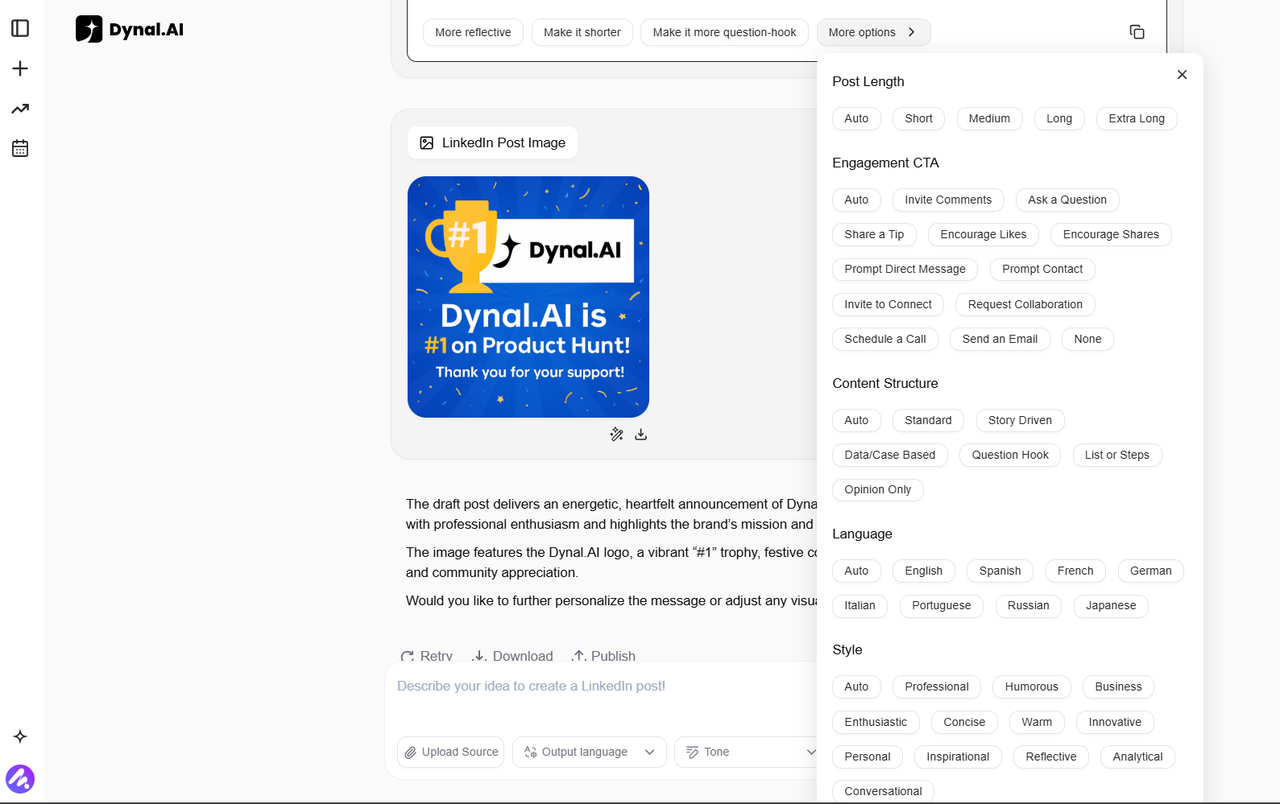
When you choose one of these prompts, Dynal.AI regenerates the full draft with that adjusted creative direction — helping you compare different expressions of the same idea without rewriting from scratch.
This system allows you to experiment quickly with tone, length, and structure to find the version that best matches your message, audience, and goals. Whether you’re aiming for a more personal note or a sharper professional edge, Dynal.AI helps you iterate efficiently and confidently.
Smart Visual Editing
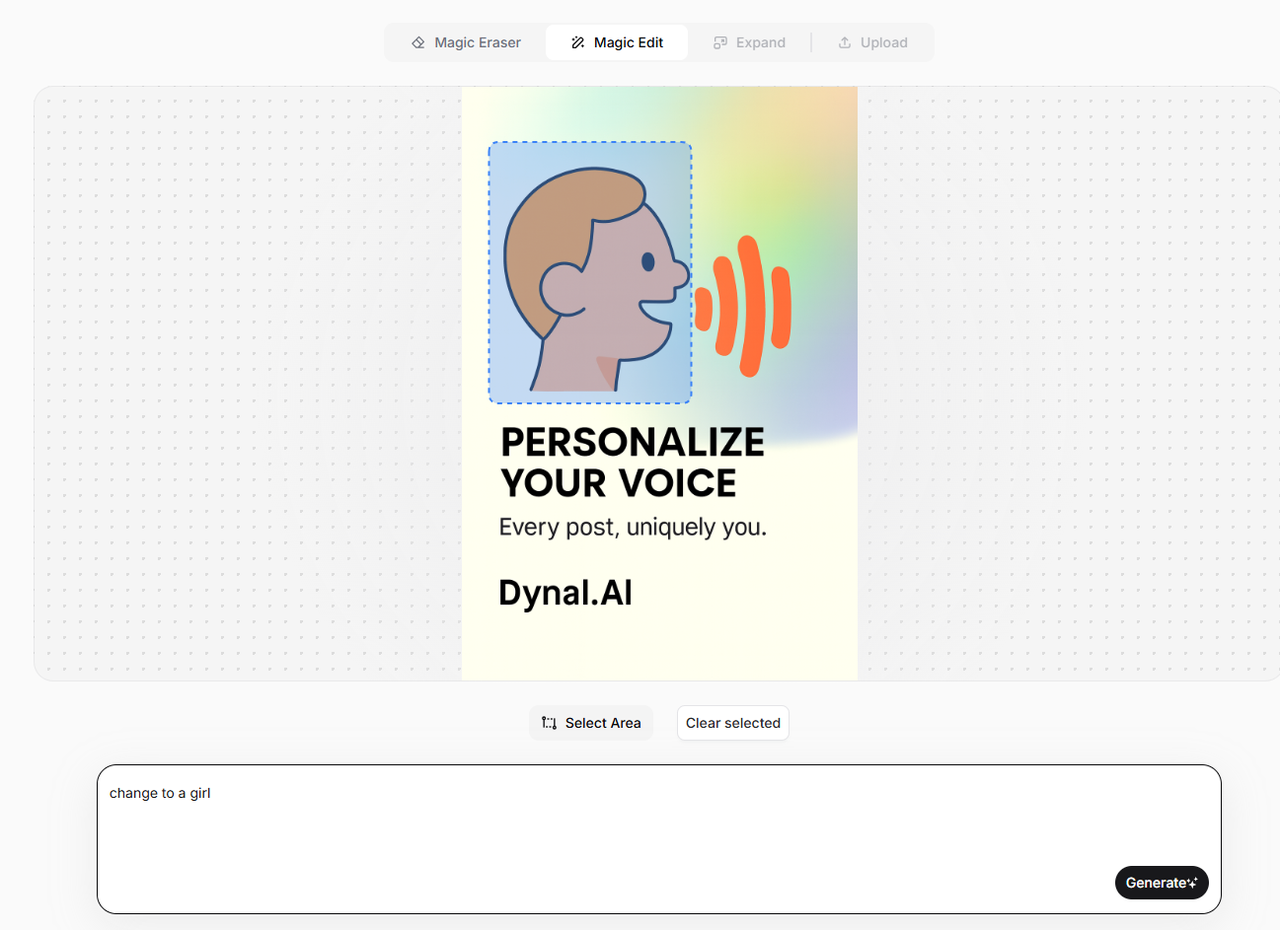
For visuals, Dynal.AI uses a Magic Edit feature that lets you describe the exact change you want to make — such as “update the heading text to say ‘Milestone unlocked’” or “replace the trophy with a laptop illustration.”
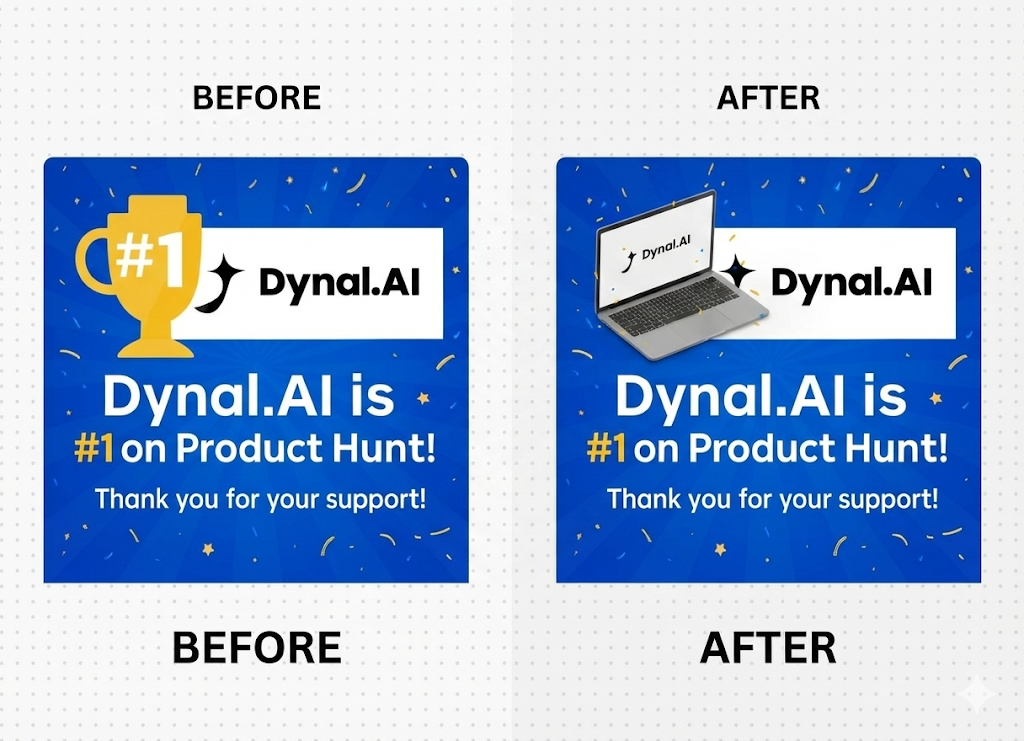
The AI then regenerates that section of the image automatically, ensuring the new version stays visually consistent and polished. This gives you the flexibility to refine your visuals effortlessly while maintaining a professional look — no design software or manual edits required.
D. Effortless Publishing
Seamless LinkedIn Integration
Publishing your content to LinkedIn should feel effortless — and with Dynal.AI, it is.Share your completed posts directly to your personal or company LinkedIn page in just one click, or schedule your preferred release time. No complicated setup or manual upload process — just smooth, simple publishing designed for anyone who wants to stay consistent without the hassle.
Multi-Account Control
Managing multiple LinkedIn profiles or company pages is simple with Dynal.AI. You can link multiple LinkedIn pages to your Dynal.AI account. When you are ready to publish, you can choose exactly which account to post from, so you never have to copy-paste content or worry about mixing up profiles again. This makes it easy to maintain a consistent presence across your personal brand and any brands or companies you represent, all from one place.
Realistic Preview Functionality
Before publishing, Dynal.AI provides an exact preview of how your post will appear in LinkedIn feeds, eliminating unpleasant surprises and ensuring visual elements display correctly across devices.
Multi-Platform Adaptation (Coming Soon)
While Dynal.AI currently focuses on helping you shine on LinkedIn, we’re already building for what’s next.
Our upcoming cross‑platform publishing feature is designed to help you manage and share content seamlessly across Instagram, X (formerly Twitter), Facebook, and LinkedIn — all from one creative hub. Though still in development, this capability will ensure your message stays consistent, wherever your audience connects with you.
E. Transparent AI Guidance
Clear, Contextual Insights
Dynal.AI believes that creativity works best when you understand what’s being created — not just how it looks. That’s why every piece of content Dynal generates comes with a short, clear summary of its creative intent. You’ll see the tone, purpose, and visual direction behind each draft — like “an upbeat post celebrating community milestones” or “a professional tone focused on thought leadership.” These quick, digestible insights help you instantly grasp the direction of each post so you can decide whether it aligns with your message or needs a tweak.
Collaboration, Not Complexity
Rather than overwhelming users with technical explanations or abstract learning modules, Dynal keeps things simple and actionable. The platform highlights what each draft aims to accomplish — making it easy for you to personalize content, adjust tone, or fine‑tune visuals on the spot.
Every suggestion feels like a creative partner offering context, not a teacher giving lessons — keeping you confidently in control of your voice while saving valuable time.
F. Comprehensive AI-Powered Features
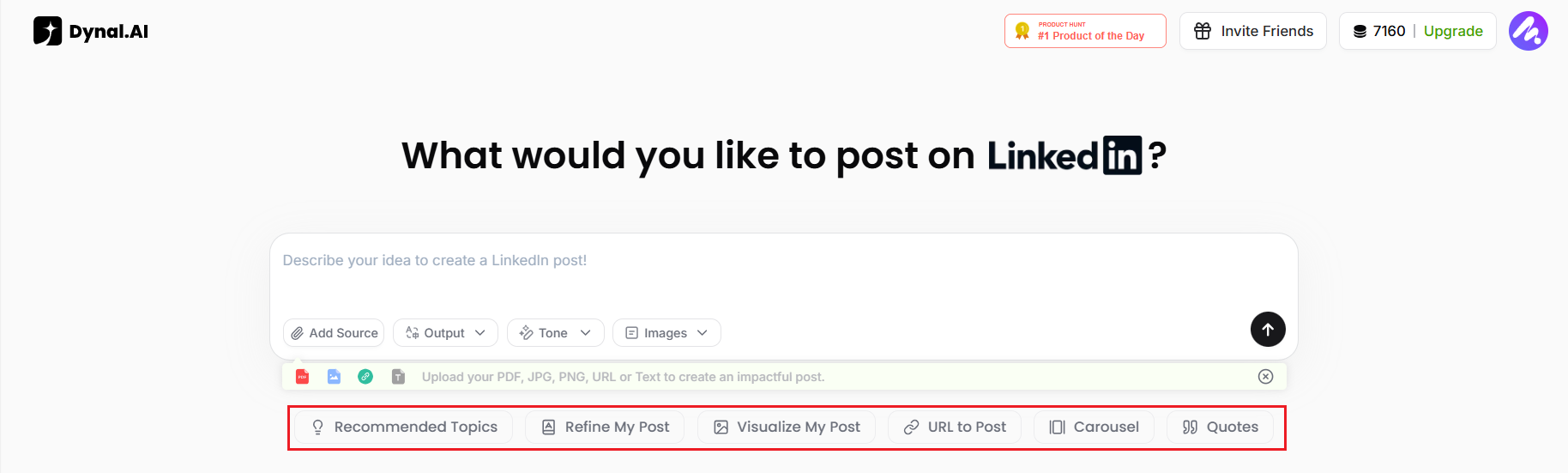
Out of inspiration for your LinkedIn post? Don't worry! Whether you're starting from scratch or looking to refine an existing draft, Dynal.AI provides everything you need to create impactful LinkedIn posts effortlessly. Dynal.AI goes beyond simple automation by offering a diverse range of tools designed to simplify and enhance every aspect of LinkedIn post creation. Each tool is crafted to empower users while maintaining transparency and efficiency. Here’s a closer look:
Recommended Topics: Get personalized suggestions for LinkedIn posts tailored to your profile, audience, and expertise.
Refine My Post: Polish your drafts by improving clarity, flow, and readability for a professional finish.
Visualize My Post: Automatically generate visuals that complement your content, making posts more engaging.
URL to Post: Paste any link to generate compelling copy and visuals that summarize key points effectively.
Carousel: Create multi-slide carousels with ease, including engaging copy and visuals to present detailed ideas.
Quotes: Generate attractive quote cards from your input, perfect for sharing impactful messages.This comprehensive set of tools ensures that every LinkedIn post you create is impactful, visually appealing, and tailored to your goals.
G. Top Trending Posts for Inspiration
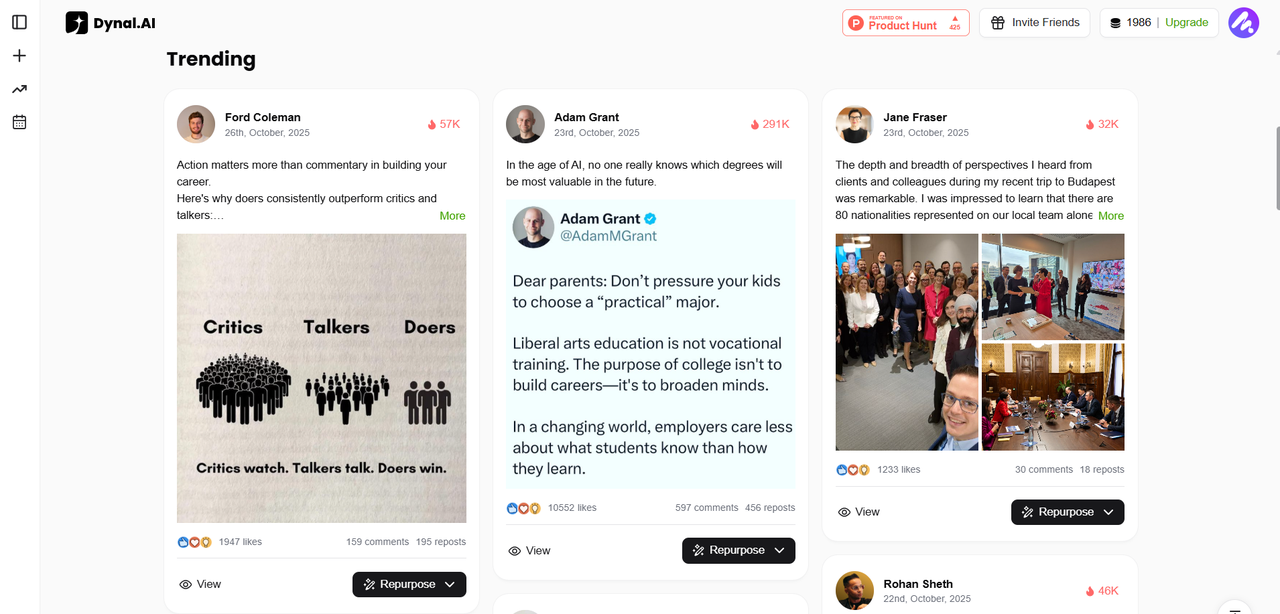
If you scroll to the bottom, you'll see our 'Trending' section, which contains a collection of our carefully curated selection of the top trending posts, constantly refreshed. Here, you can browse through examples from top LinkedIn voices and learn from their writing style, then adapt the post to your own needs.
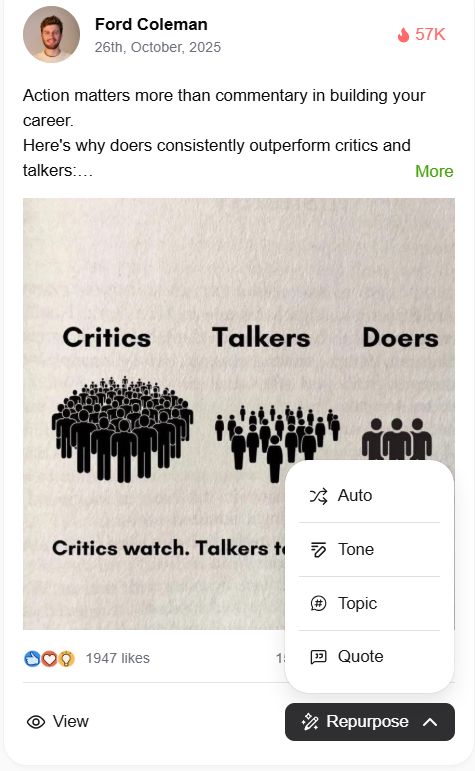
If you click on 'Repurpose', you'll see 4 options: 'Auto', 'Tone', 'Topic' and 'Quote'. '
Auto' allows you to create a new LinkedIn post inspired by your chosen post, keeping a similar tone and structure but focusing on a fresh idea.
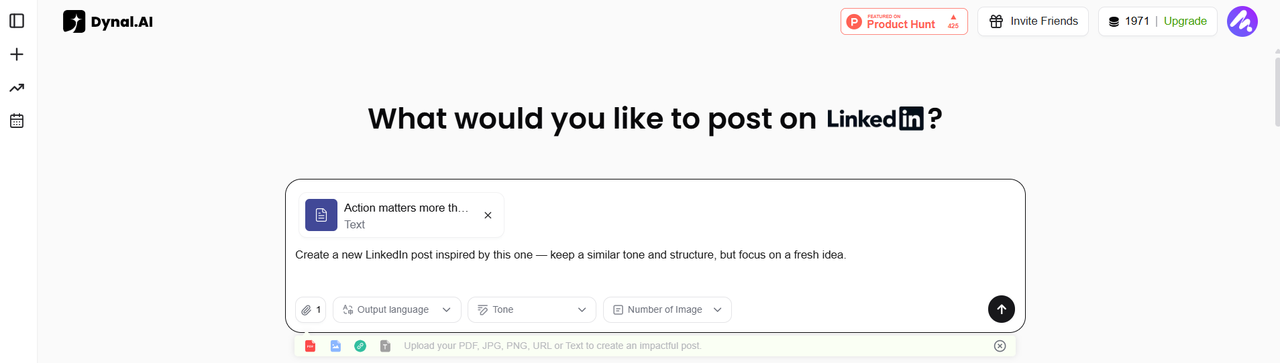
'Tone' allows you to write a new post in the same tone and rhythm as your chosen post, on a different topic.
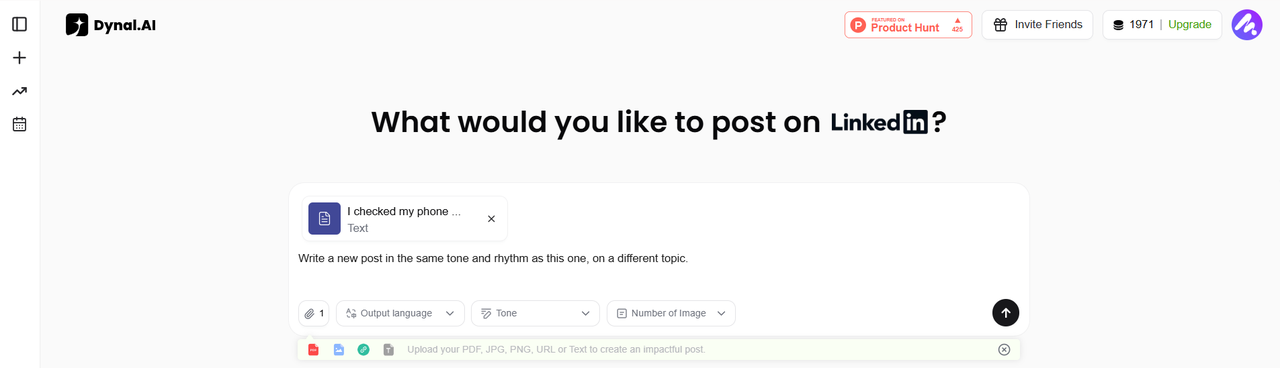
'Topic' allows you to delve deeper into the topic of your chosen post, exploring it from a new angle or with new insight.
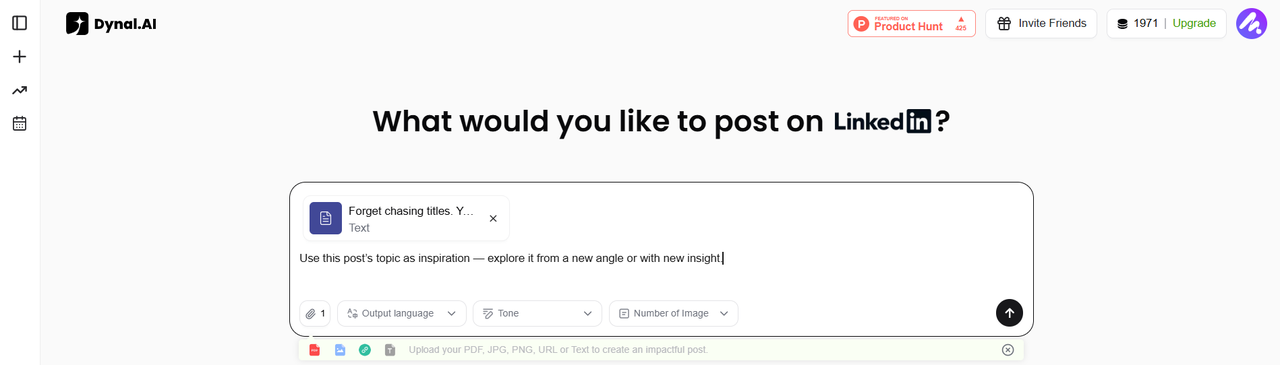
'Quote' allows you to reference your chosen post and add your own additional reflection or perspective on the topic.
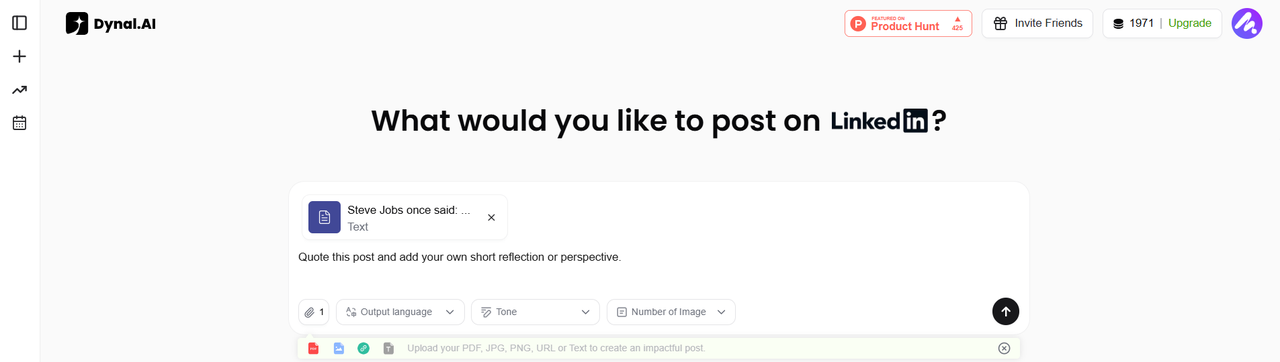
The prompts you see in the prompt box are the defaults, but feel free to tweak the prompts to your liking! Simply click inside the prompt box to make the necessary edits.
H. Plan: your AI posting co‑pilot
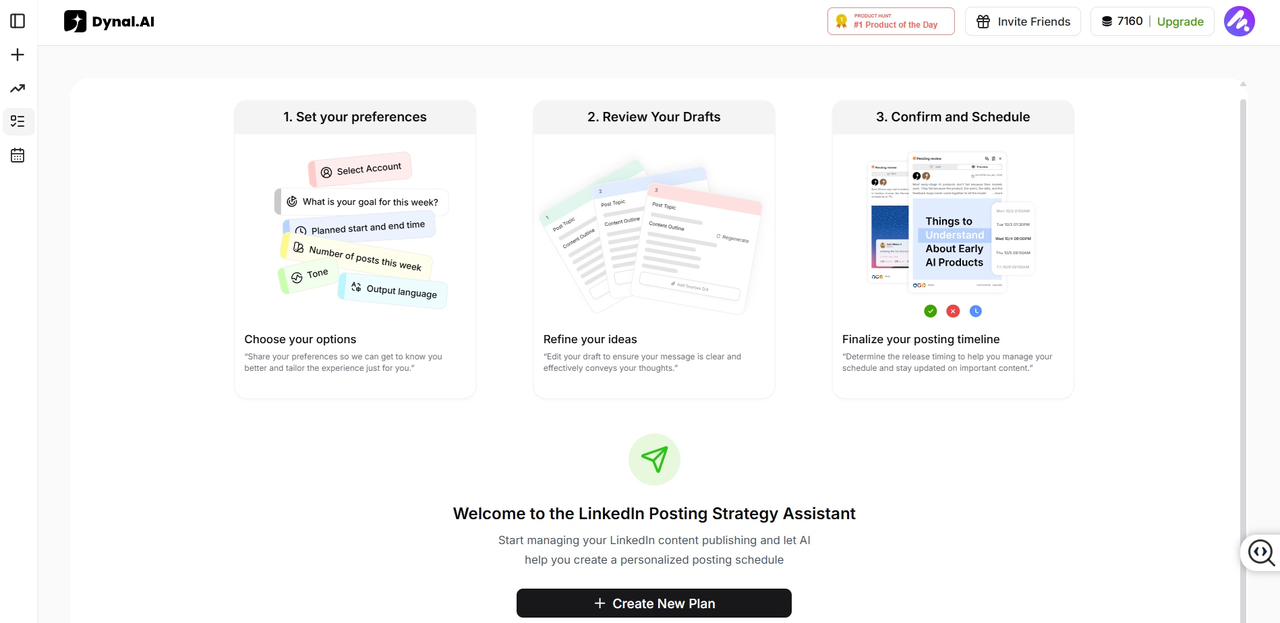
Turn scattered ideas into a clear, consistent LinkedIn plan in just a few clicks. The Plan feature helps you decide what to post, how often, and when—so you can stay visible without thinking about scheduling every day.
Share your goals and focus
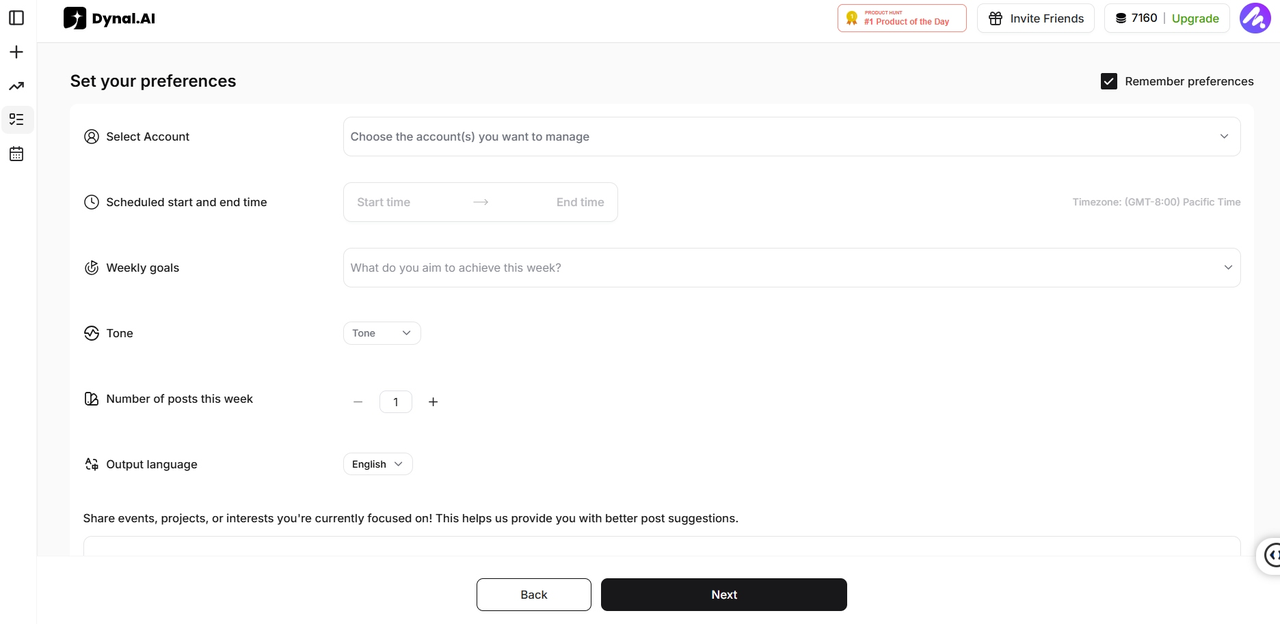
Start by telling Dynal.AI what you want to achieve this week (for example, increase visibility or stay active) and how many posts you want to publish. You can also set your time window, tone, and output language so every post aligns with your current priorities. Next, drop in your post ideas—topics you want to talk about, launches, learnings, or prompts you have in mind.
Turn ideas into a weekly schedule
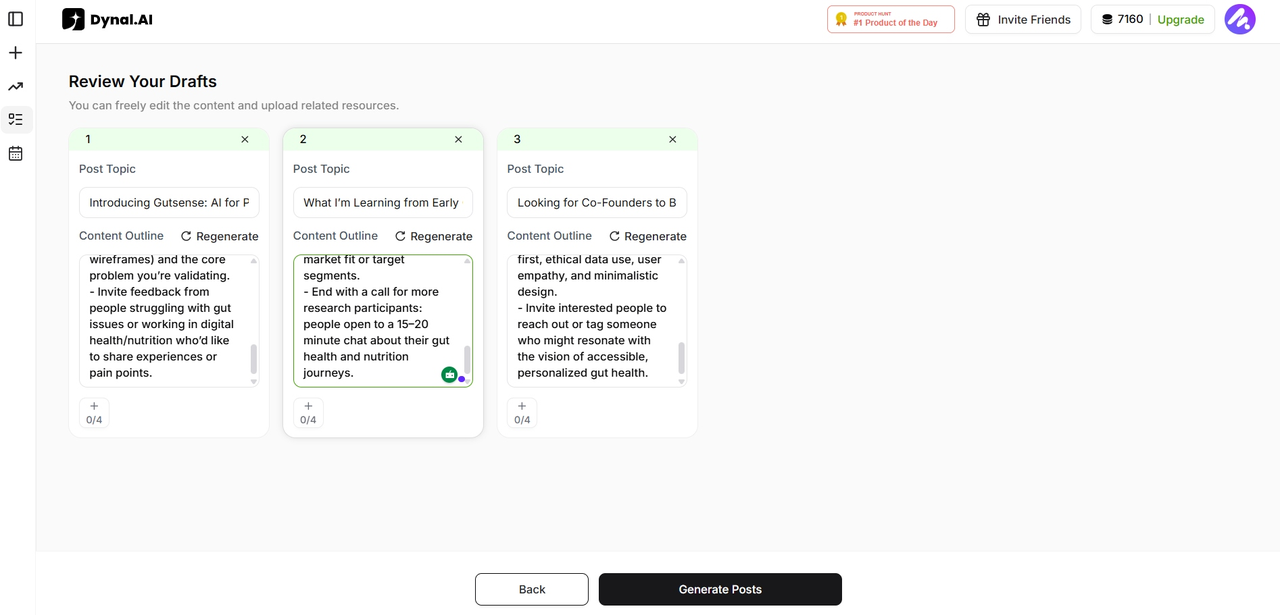
Dynal.AI transforms these ideas into a planned sequence of posts, spreading them intelligently across the week based on the number of posts you selected.
Generate, review, and finalize on your time
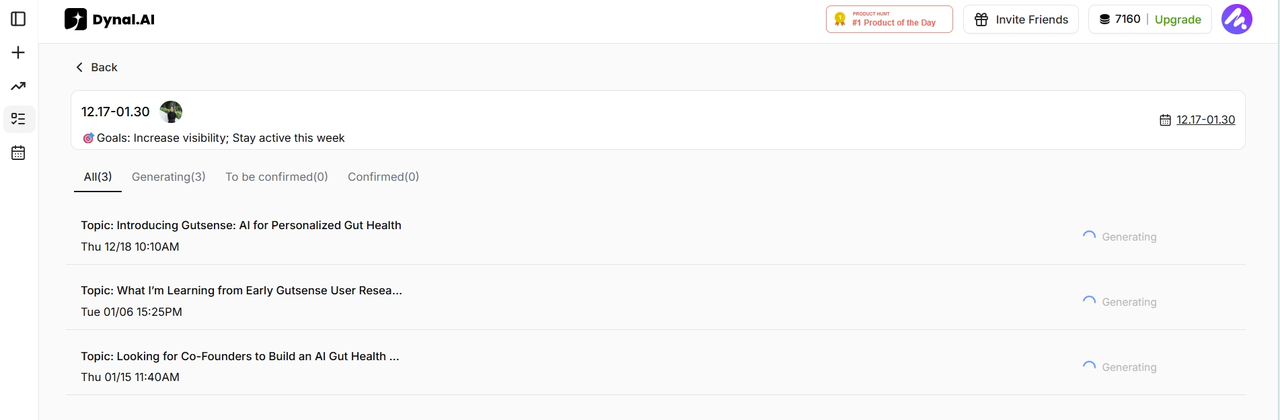
Once you hit “Generate,” Dynal.AI works in the background so you can close the tab and get back to your day. You will receive an email when your posts are ready, making it easy to jump back in, review the drafts, make edits, and approve them.
Confirm and schedule with confidence
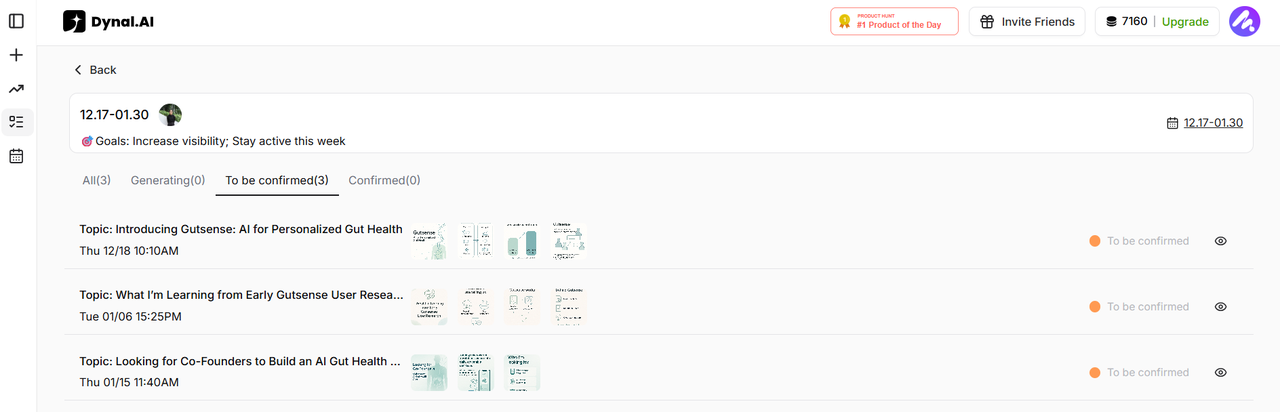
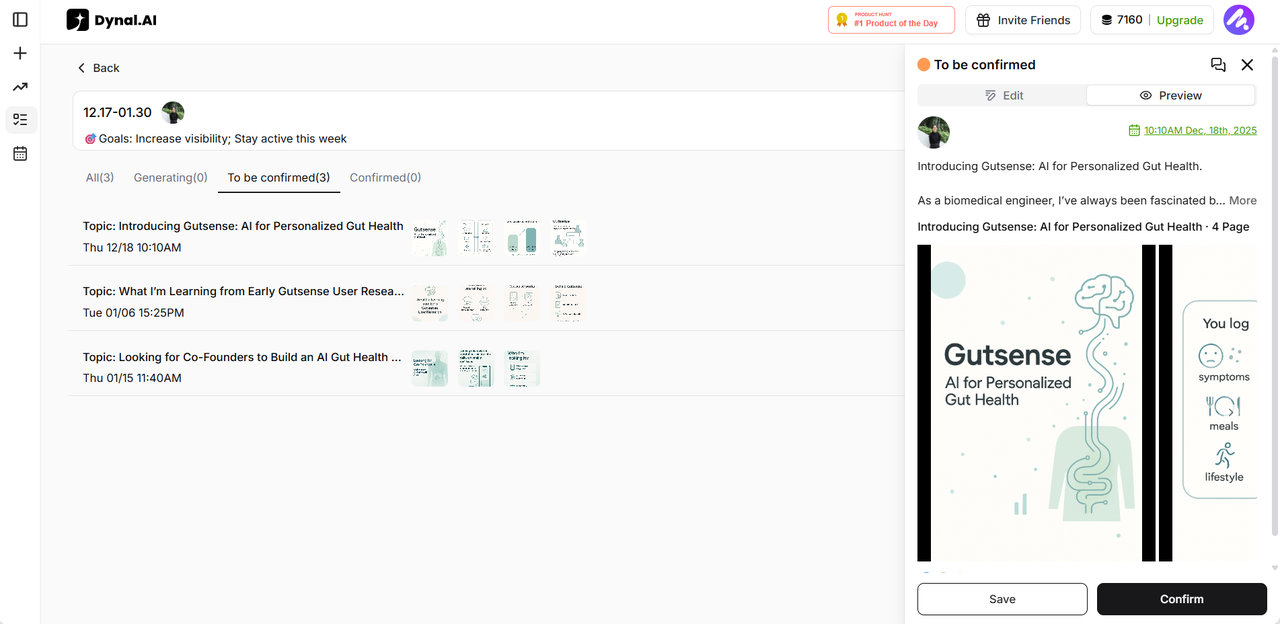
Once your posts have been generated, you can confirm each post and choose the exact time you want it to go live. (Dynal.AI will schedule a posting date and time for you, but feel free to change it as you wish!) This lets you maintain a consistent posting rhythm that matches your goals, without manually scheduling every single piece of content.
The Dynal.AI Workflow
Step 1: Sign up and set up your profile
Begin your Dynal.AI journey by creating an account and completing your profile setup. This involves connecting your LinkedIn account (with robust security protections), answering targeted questions about your content goals, what kind of work you do, content type preferences etc. The platform also analyzes your existing LinkedIn activity to understand your natural communication style.
Pro Tip: Be specific about your professional objectives during setup. The more Dynal.AI understands about your goals, the more relevant its recommendations will be.
Step 2: Add your source materials
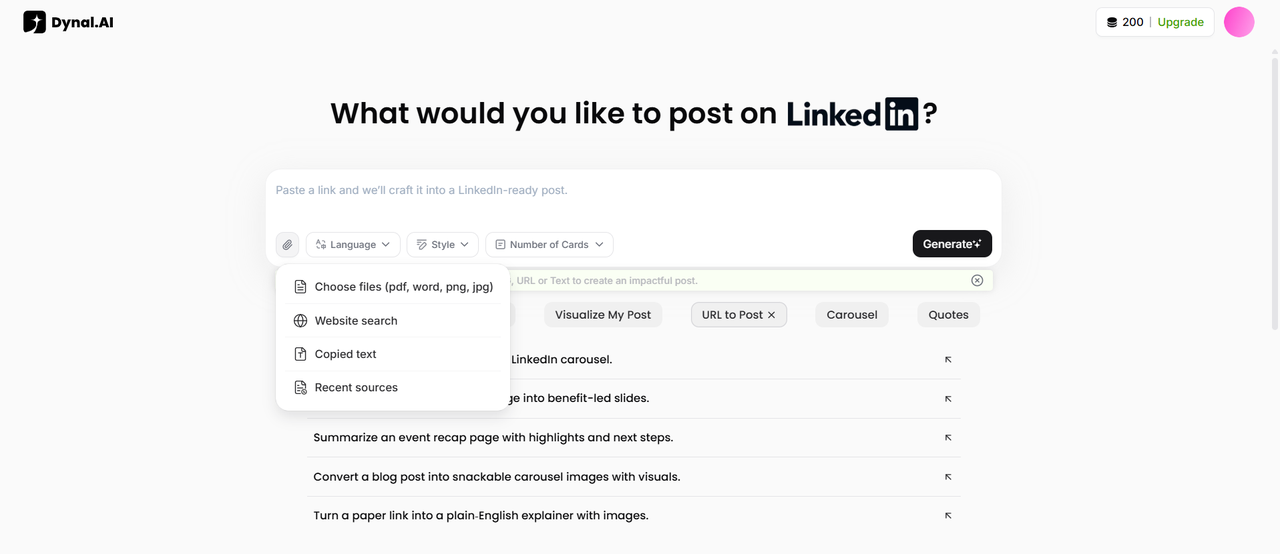
Once your profile is complete, you're ready to start creating content. Upload your source materials—whether that's a link to an industry article, a PDF of your latest research, an image with key data, or simply text notes about a topic you want to discuss.
Pro Tip: For best results, include materials that contain specific data points, unique insights, or personal experiences. These elements help Dynal.AI create distinctive content that showcases your expertise.
Step 3: Dynal.AI analyzes and generates content
The platform's advanced AI processing system analyzes your materials, extracting key points and identifying potential narrative angles. Within moments, Dynal.AI generates a complete LinkedIn post tailored to your voice, goals, and audience.
Simultaneously, the platform creates complementary visual content based on your post. You'll receive professionally designed image options that highlight key messages from your content. These visuals use attention-grabbing designs with modern typography and color schemes to enhance engagement.
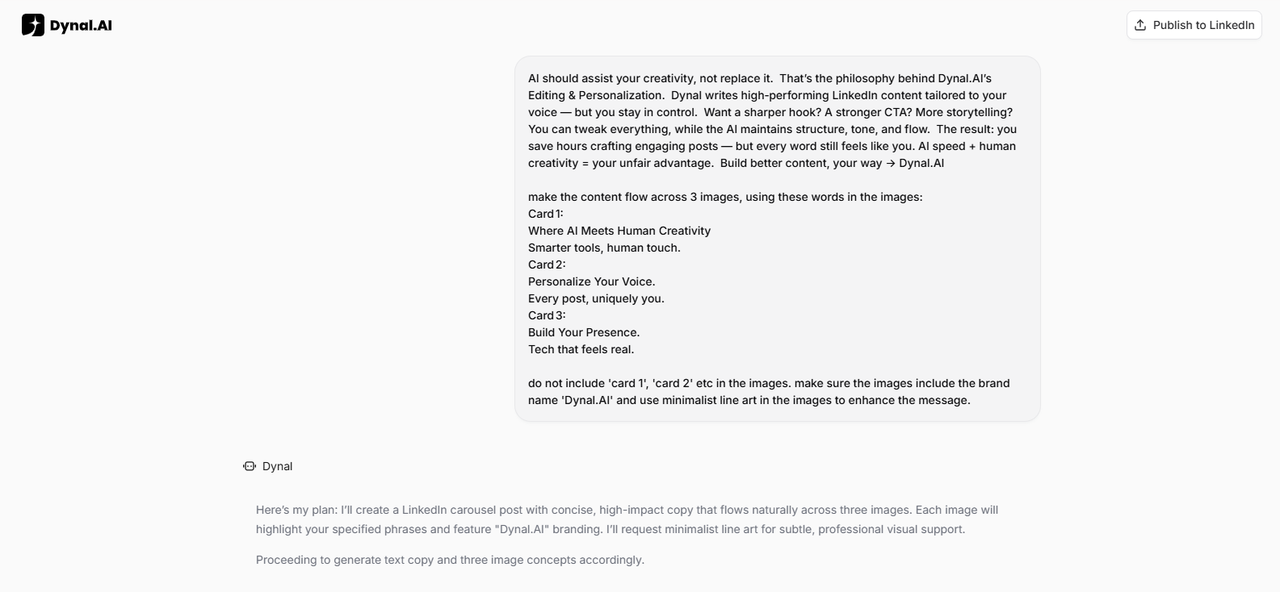
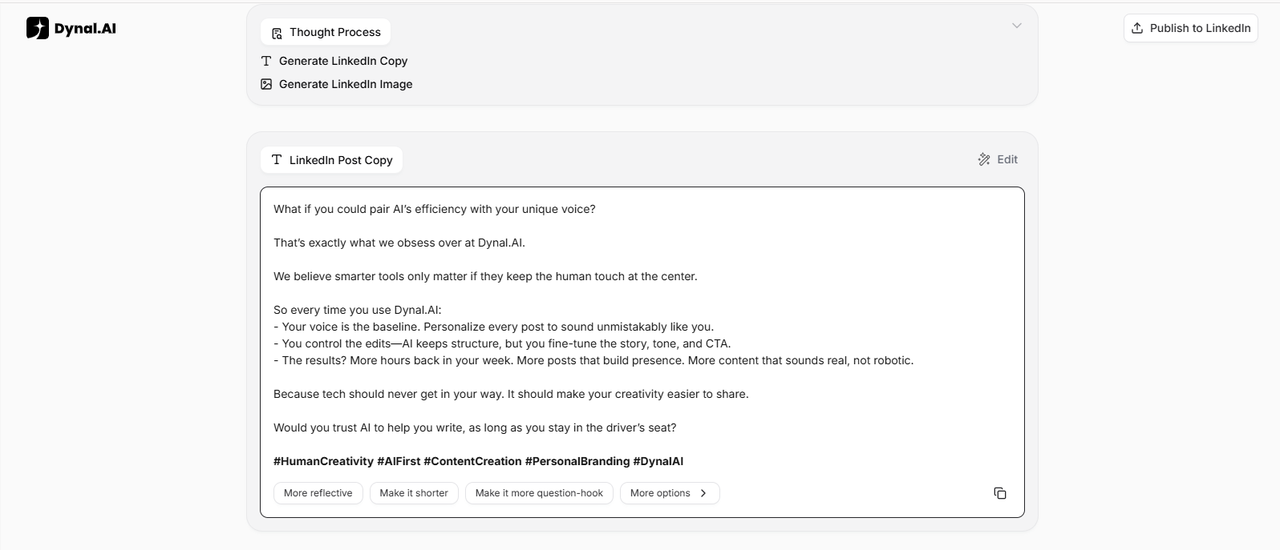
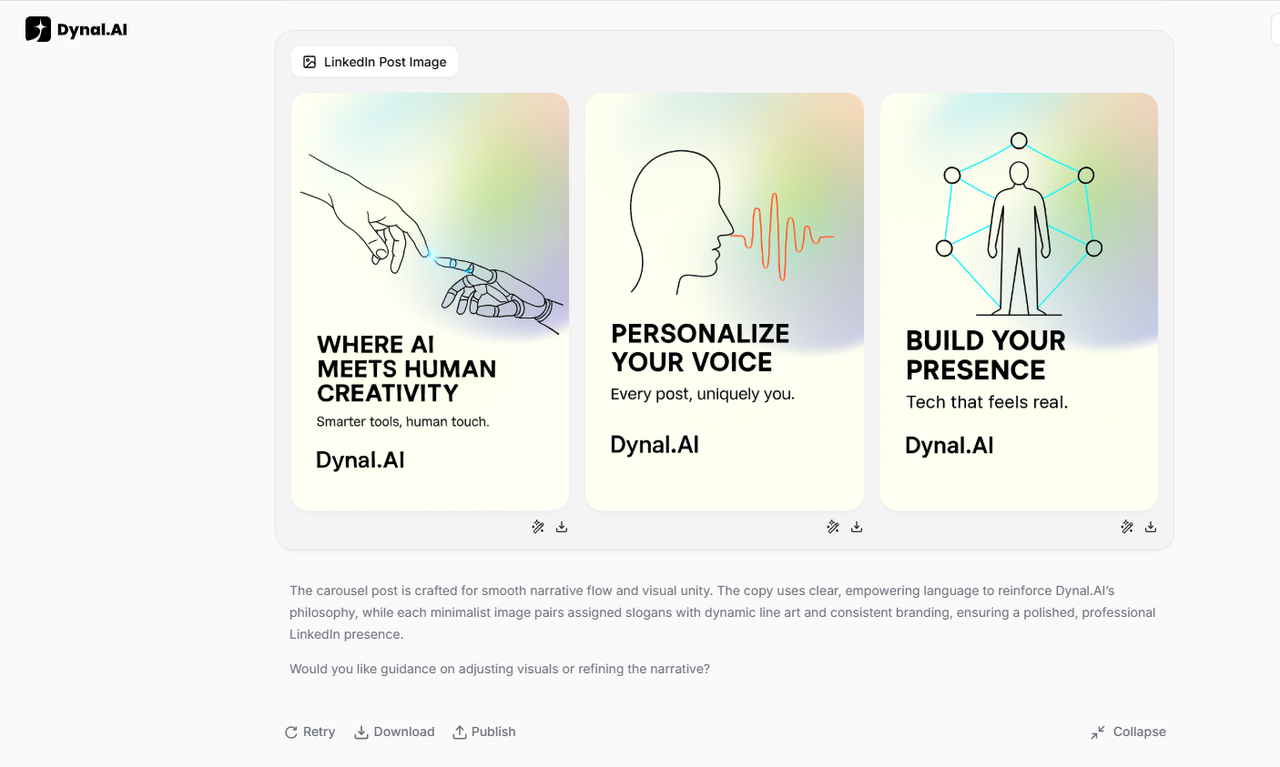
Step 4: Edit and customize your post
Post Copy
Review the generated content and make any desired adjustments using Dynal.AI's intuitive editing interface. Select prompts such as 'More it more question-hook' or 'Make it shorter' to tweak the copy to your liking.
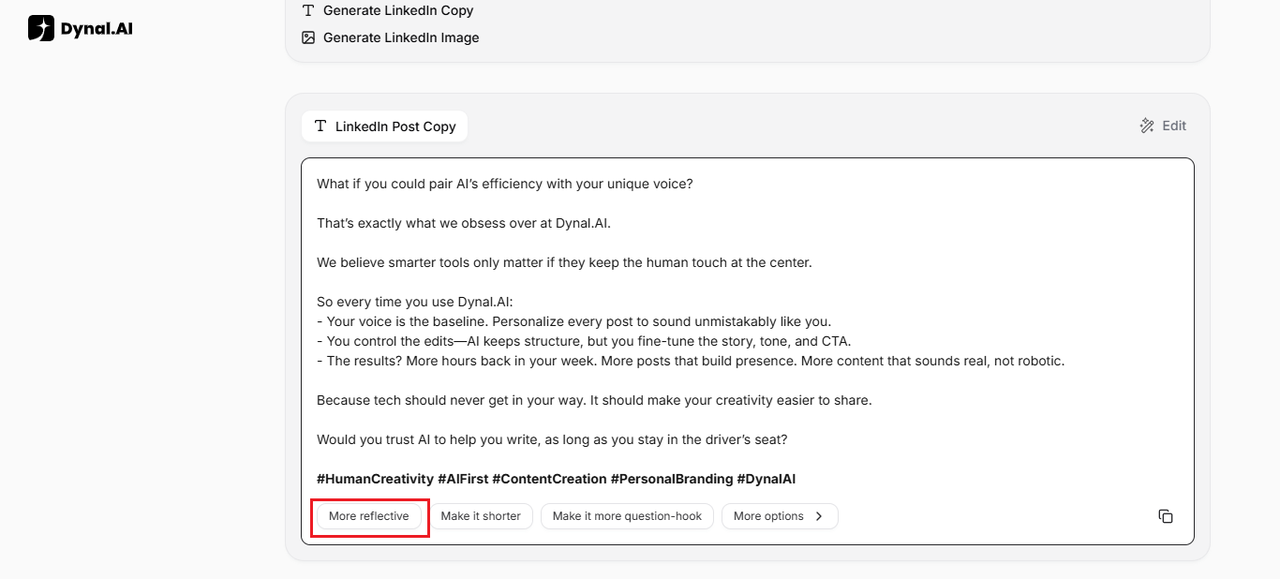
Pro Tip: Explore different approaches to your opening hook—the first few lines are critical for stopping the scroll on LinkedIn.
Post Visuals
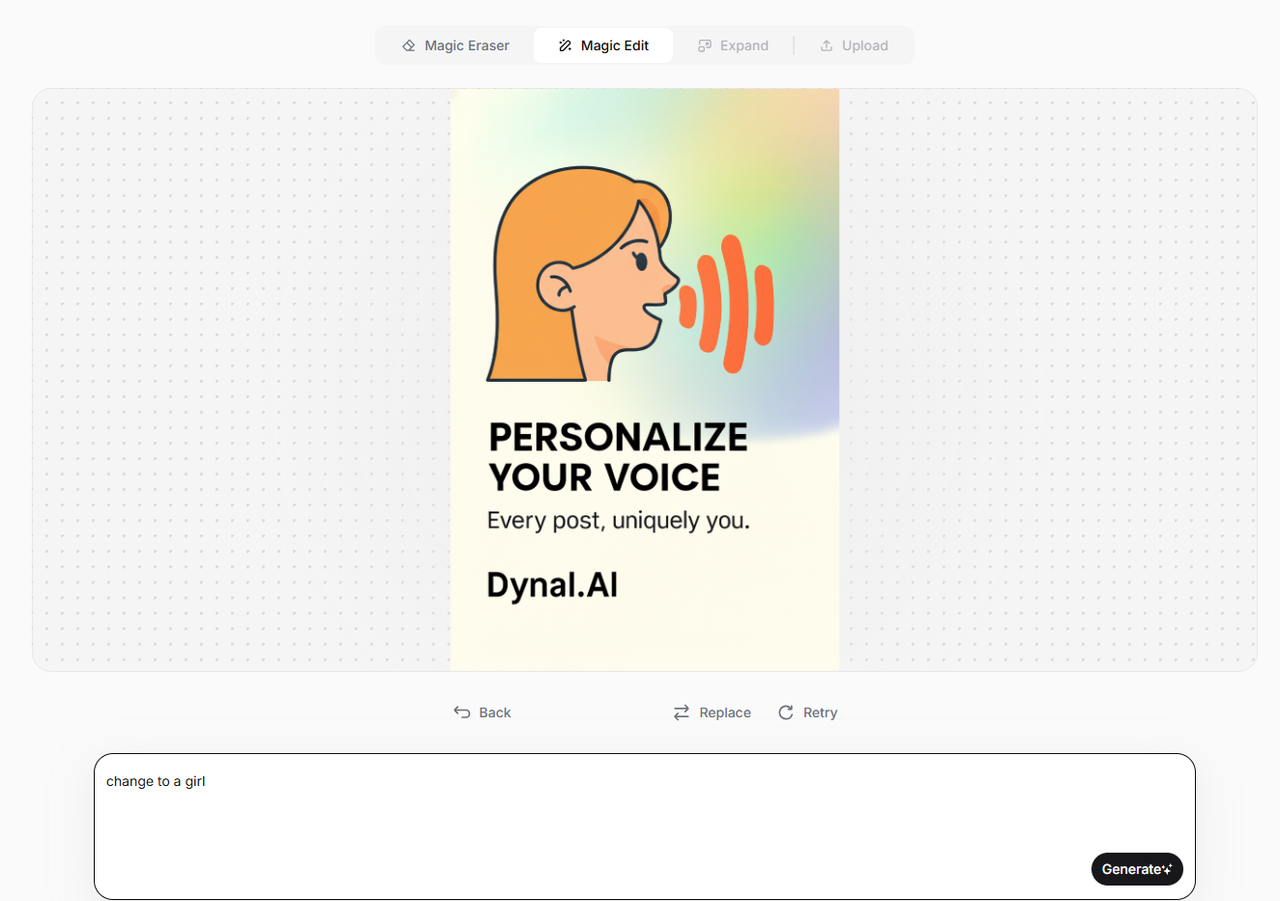
Change the style of the visuals by simply prompting Dynal.AI in the chat! I changed my line art style visuals to a cartoon style:
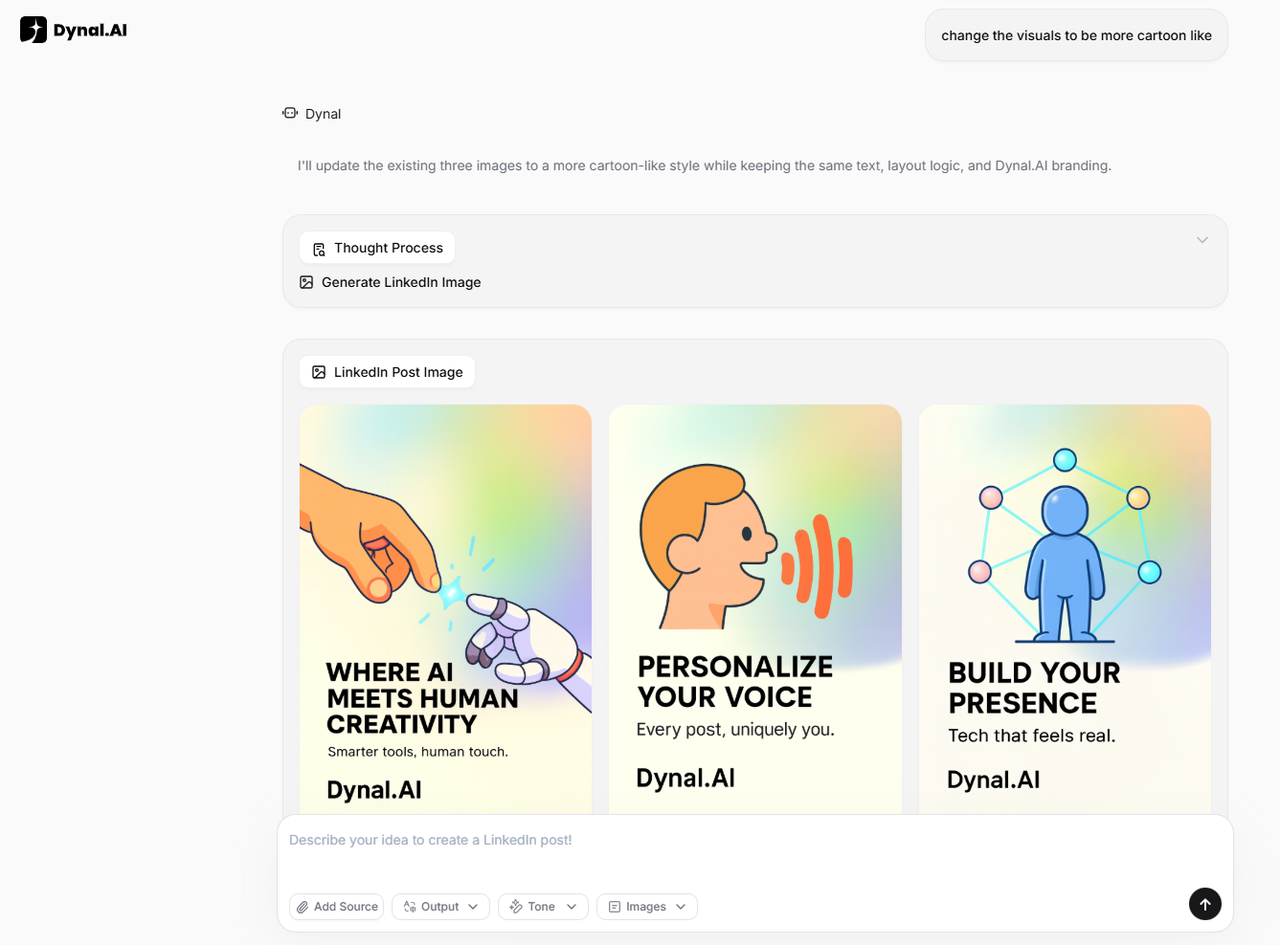
Use the 'Magic Edit' function in the visual editor to describe any changes you want to make, click 'Generate' and watch as the AI magically applies them to your image.
Step 5: Preview your final post
Before publishing, use the preview function to see exactly how your post will appear in LinkedIn feeds. Click on the 'Publish to LinkedIn' button:
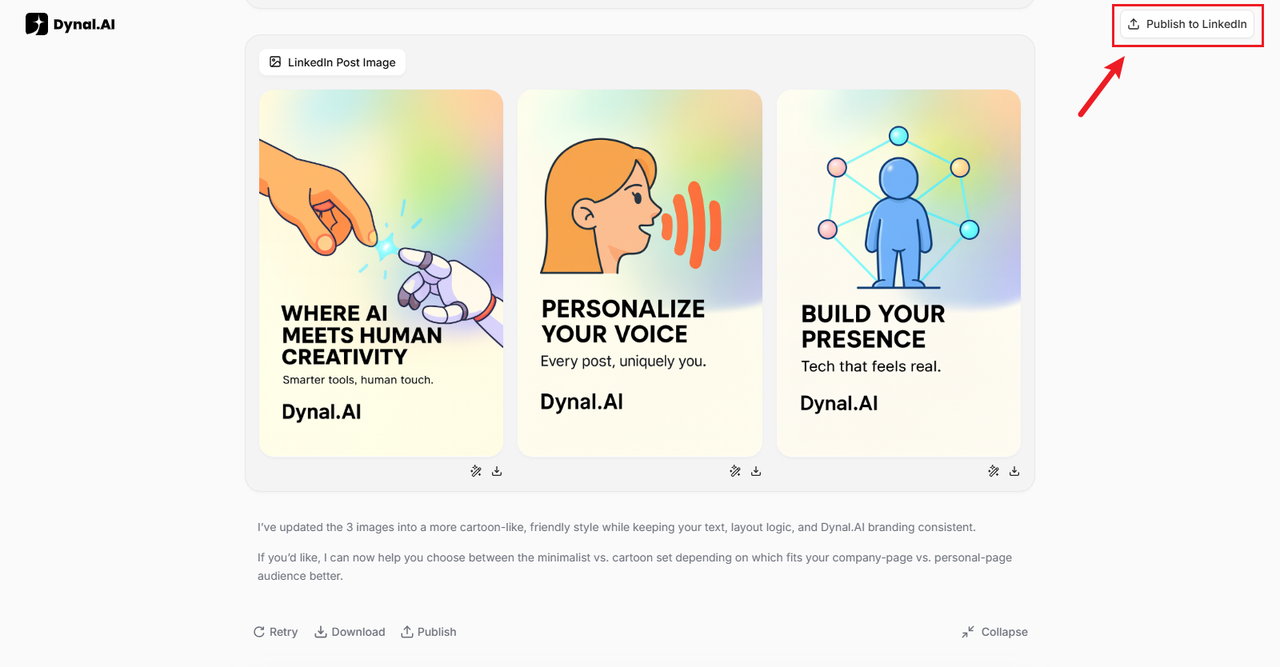
A side panel will then pop up. You can choose to upload the generated draft or directly paste your own.
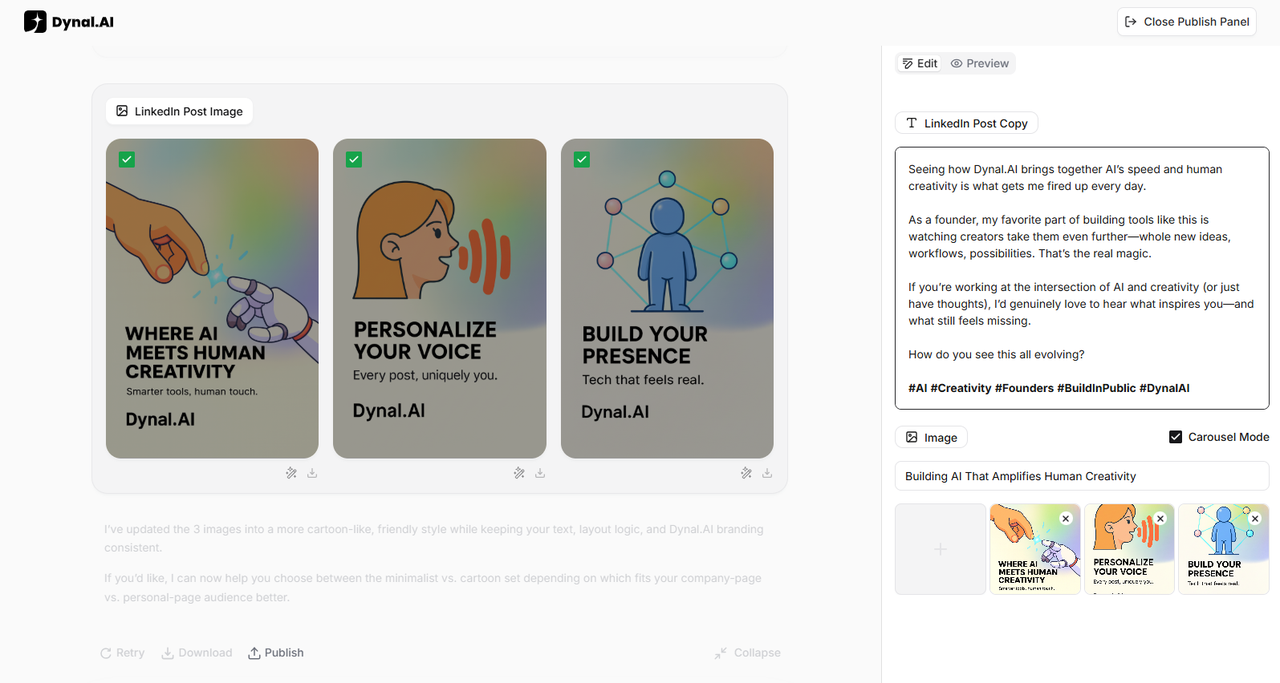
You can enable Carousel Mode to convert your images into PDF format! This format is great for informational visuals with text - your followers can easily swipe to view the photos and download the whole PDF file conveniently without changing the order of the slides.
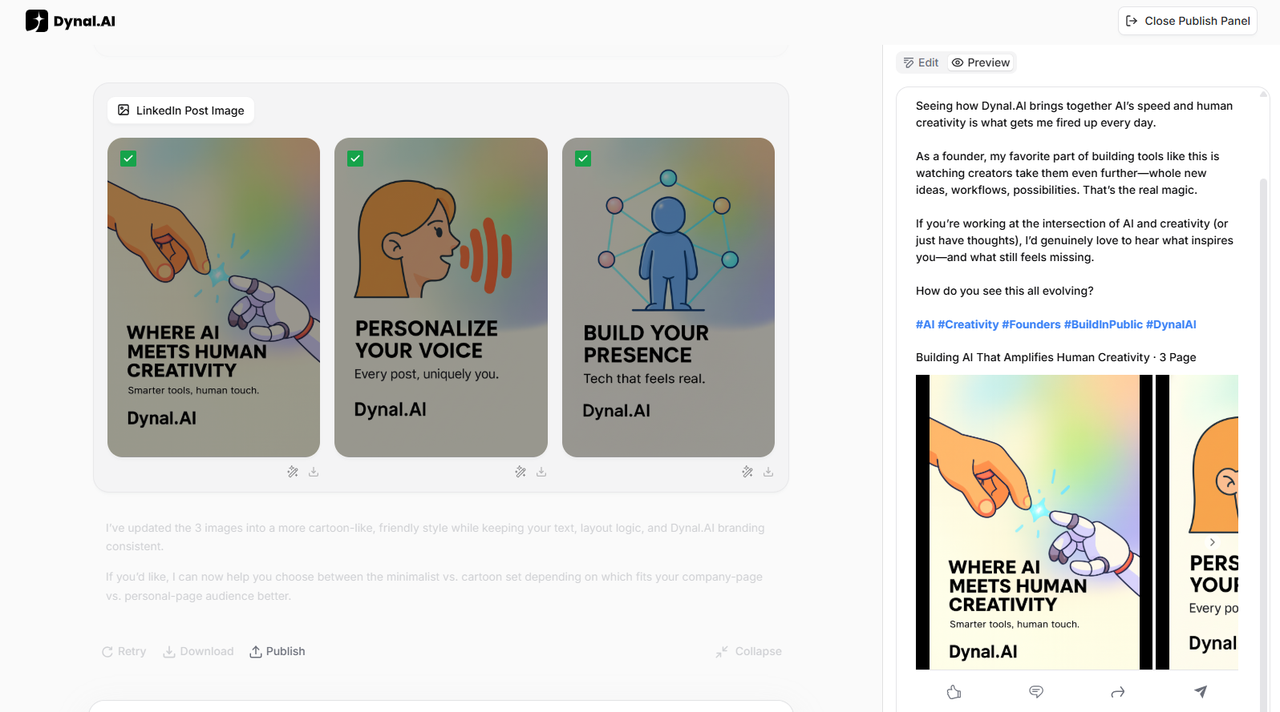
Switch to the Preview tab to check image placement, text formatting, and link previews to ensure everything looks professional and polished.
Step 6: Publish instantly
When you're happy with your content, you can publish it to LinkedIn instantly with a single click using the “Publish” button. Dynal.AI takes care of all the technical details so your post displays correctly and reaches your audience right away, or you can choose to schedule it to go live at a specific time instead.
Pro Tip: Schedule your post for peak engagement times based on your region and audience activity patterns. As a general guideline, Tuesday or Wednesday mornings around 8–10 a.m. work well for many. However, finding the right timing can vary from person to person; experiment with different timings to find what's best for you!
Why Dynal.AI Is Different
In a landscape crowded with posting tools and content schedulers, Dynal.AI stands apart through its fundamentally different approach to LinkedIn content creation:
AI that adapts to you, not vice versa
Unlike platforms that force you to work within rigid templates or "AI voices," Dynal.AI continuously learns your preferences, communication style, and professional objectives to deliver increasingly personalized recommendations and content.
Complete content package—text AND visuals
Dynal.AI creates both compelling written content and professionally designed visuals that work together to maximize engagement. This eliminates the need to switch between writing tools and design platforms, providing a seamless creation experience.
Hours saved across the content lifecycle
Dynal.AI eliminates time-consuming tasks at every stage of content creation—from research and ideation to writing, editing, and publishing. Users report saving 3-5 hours per week while actually increasing their posting frequency.
Quality-focused growth strategy
Instead of chasing vanity metrics or posting for the sake of consistency, Dynal.AI helps you grow by publishing fewer but higher-impact posts that sound like you and build real authority with your audience. By deeply learning your tone, stories, and expertise, it crafts content that earns more saves, comments, and profile visits over time—signals that drive sustainable LinkedIn reach and follower growth.
Learn as you publish
Every recommendation comes with transparent explanation, turning Dynal.AI into both a productivity tool and a LinkedIn strategy coach. Users develop stronger content instincts through regular interaction with the platform's guidance.
FAQs
Who can benefit from Dynal.AI?
Dynal.AI serves professionals across industries who recognize the value of LinkedIn presence but struggle with consistent content creation. This includes executives, founders, marketers, consultants, coaches, subject matter experts, and anyone looking to build professional influence without sacrificing hours to content creation.
How is this better than other LinkedIn tools?
Unlike scheduling tools that simply automate posting times or generic AI writers that produce cookie-cutter content, Dynal.AI provides an end-to-end solution that learns your unique voice, generates tailored content from your materials, creates professional visuals, and continuously improves based on your preferences and audience response. The platform combines strategy, creation, and distribution in a seamless experience designed specifically for LinkedIn excellence.
Can I use my own images/text?
Yes! Dynal.AI encourages the use of personal images and original text. While the platform can generate complete posts from scratch, it performs best when enhancing and transforming your existing materials into optimized LinkedIn content. You can upload your own visuals before posting, or start with Dynal.AI's generated visuals and customize them to your preferences.
Get Started with Dynal.AI: Your Path to LinkedIn Influence
In a world where attention is currency, Dynal.AI is your passport to LinkedIn influence. This AI LinkedIn agent does more than automate posts—it empowers you to create, strategize, and publish content that cuts through the noise and builds your brand, one post at a time.
If you’re ready to transform your LinkedIn strategy, save hours each week, and become a thought leader in your industry, Dynal.AI is your secret weapon. Start today—and create smarter, influence faster.