

Once your Dynal.AI account is set up, it’s time to unlock the true power of a personalized content strategy. Dynal.AI doesn’t just generate posts—it learns your unique voice, understands your goals, and crafts a custom roadmap to elevate your LinkedIn influence. This guide will show you, with real screenshots, how to set and refine your objectives, receive AI-powered topic recommendations, and build a content plan that drives real results.
Table of Contents
- Why Personalized Strategy Matters
- How Dynal.AI Learns About You
- Setting Your Goals and Preferences
- Getting Smart Topic Recommendations
- AI-Driven Content Planning
- Pro Tips for Maximizing Your Strategy
- Next Steps
Why Personalized Strategy Matters
LinkedIn is crowded—standing out means posting the right content, at the right time, to the right audience. Dynal.AI’s personalization features help you:
- Save time by removing guesswork or blank-page anxiety.
- Deliver results with targeted advice based on your goals.
- Accelerate growth through consistency and relevance.
How Dynal.AI Learns About You
Dynal.AI’s onboarding is more than just sign-up—it’s a powerful personalization engine. When you first set up your account, you’ll be guided through key Personal Settings:
- Set up your personal profile: Define your role, experience, and goals to establish credibility and focus.
- Industry Pattern Recognition: Dynal.AI analyzes content trends in your sector to tailor its recommendations.
- Tone & Language Mapping: The AI adapts to your voice and style for authentic posts.
- Audience Topic Scan: Dynal.AI scans your target audience’s roles and pain points to surface high-relevance themes.
Setting Your Goals and Preferences
To maximize Dynal.AI’s impact, fill out your Personalization Settings in detail.
- Access Personalization Settings: From your dashboard, click Set up now under “Personalization Settings.”
- Complete your details:
- LinkedIn profile link
- Your role and industry
- Your LinkedIn goals (e.g., personal branding, attracting clients)
- Preferred content types (e.g., thought leadership, product updates)
- Posting frequency
- Any extra info (websites, company, niche)
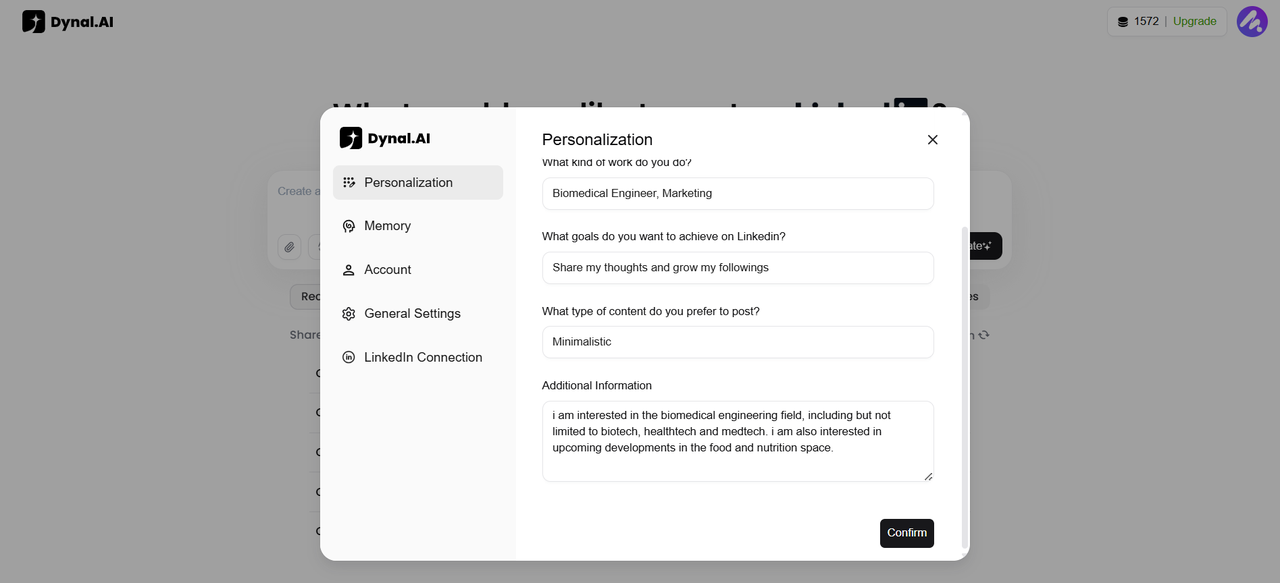
Here is an example of how I set up my Dynal.AI account! I'm interested in biomedical engineering, so that's what I added under 'Additional Information'.
- Edit or manage your memory: Click Manage current memory to update or refine your personal data—Dynal.AI learns and adapts as you grow.
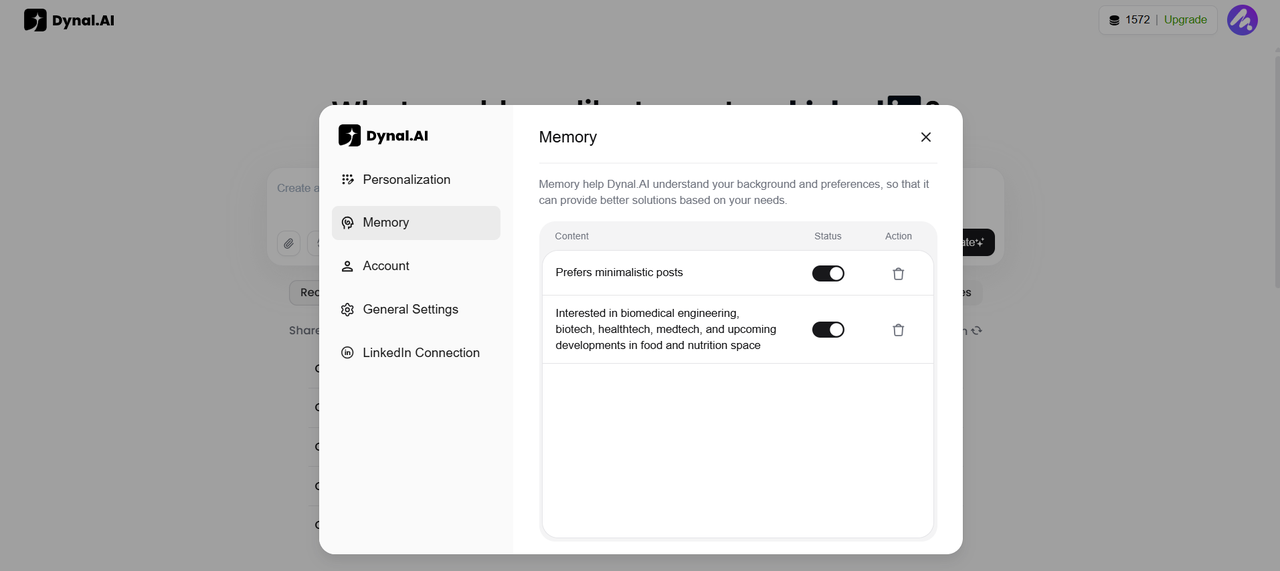
As you can see from the screenshot above, your preferences under the 'Personalization' section will automatically be stored under 'Memory' for Dynal.AI to refer to. You can choose to toggle the status on and off, depending on whether you want each content to be used, giving you full control over the output. Tip: The more you update your profile, the smarter Dynal.AI’s recommendations become!
Getting Smart Topic Recommendations
Based on your interests and stored memories, Dynal.AI gives you personalised recommendations on what to post, ensuring you never run out of content ideas. Here's an example of what my 'Recommendations' section looks like:
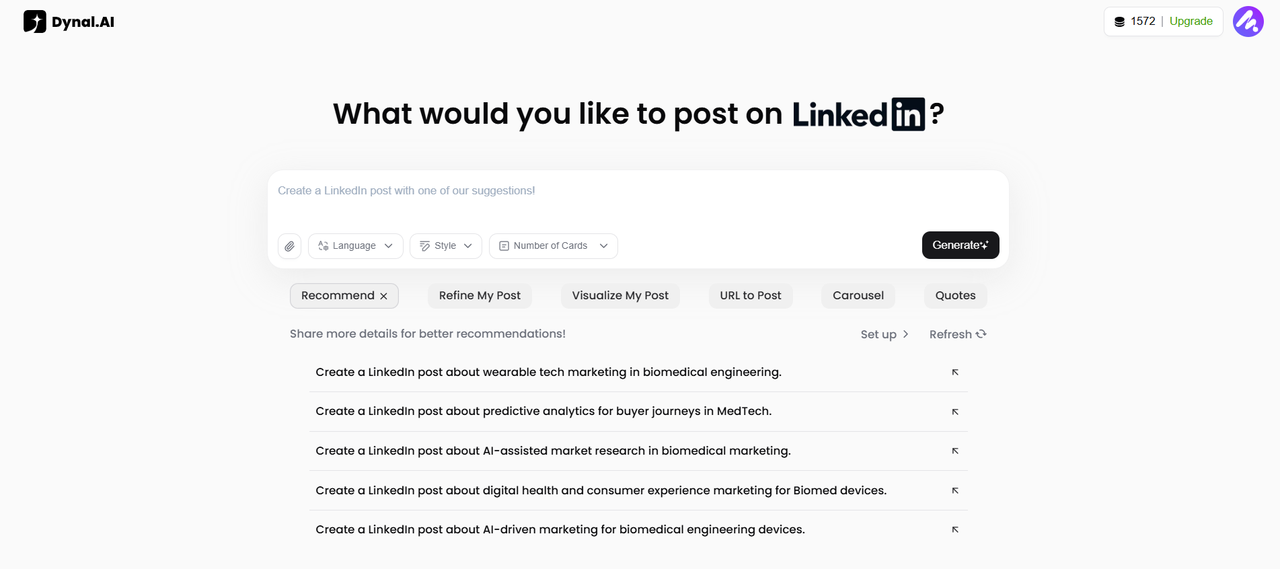
Since I am currently doing marketing and interested in biomedical engineering, the recommendations are tailored towards my interests, all centred around related topics! This ensures that my content is always consistent and maximizes my potential to reach my target audience, who are likely also interested in these topics.
Pro Tips for Maximizing Your Strategy
- Refresh regularly: Update your goals and preferences as your career evolves for always-relevant advice.
- Mix content types: Alternate between insights, stories, visuals, and news to keep your audience engaged.
- Leverage your memory: Use the memory editor to fine-tune how Dynal.AI understands and supports your journey.
Pro Tip: Not sure what to post next? Let Dynal.AI’s “Recommendations” inspire you, or repurpose a top-performing topic using a new format or angle.
Next Steps
With your personalized strategy and recommendations in place, you’re ready to create your first AI-powered post. In our next guide, you’ll learn how to generate content, import sources, and use Dynal.AI to craft professional LinkedIn posts in minutes.
Stay tuned: Effortless Content Creation & Editing with Dynal.AI →
Dynal.AI – Create Smarter. Influence Faster.