


In the world of professional speaking and thought leadership, standing out on social platforms like LinkedIn isn’t just about what you say—it’s how you say it. For high-impact communicators like Jenna R., written words alone sometimes aren’t enough to cut through the noise and make advice stick with busy audiences.
Jenna, a sought-after keynote speaker and bestselling author, is known for her vibrant energy and actionable insights. But even she faced a challenge familiar to many leaders: how to translate her powerful message from the stage to the digital world, especially when it comes to making text-based posts visually engaging and instantly recognizable.
In this case study, we share Jenna’s journey—from realizing her posts needed a visual boost, to discovering how Dynal.AI could bring her words to life with compelling graphics and illustrations. Read on to see how Jenna used Dynal.AI not just to amplify her message, but to deepen her connection with her audience and inspire more people to take action.
By Jenna R., Keynote Speaker & Author
’ve built my life and career around one message: you don’t have to wait to feel ready—you just have to get started. Every week, I share encouragement, lessons, and a little tough love with my LinkedIn community. But lately, I’d noticed something: even my best advice can get lost in a sea of text.I wanted my feed to jump out at people, to make my ideas stick. But I’m not a designer, and honestly, I don’t want to spend hours fussing over fonts and colors.
The Turning Point
A few Mondays ago, I wrote a post that really mattered to me. Here’s what I shared:
My LinkedIn post:
Stop waiting for motivation. Start moving, and motivation will follow.The biggest myth I see holding people back? Believing you have to FEEL ready before you take action.Here’s the truth: Action comes first. Momentum builds next. Confidence follows.If you’re stuck today, just take the tiniest step forward—before your brain talks you out of it.#MondayMotivation #TakeAction
I wanted this to be more than words. I wanted it to be a visual nudge—a reason for someone to stop scrolling and actually feel the advice.
My Dynal.AI Prompt
I decided to try Dynal.AI after a friend in HR raved about how easy it was for non-designers. I pasted my post into the platform and described what I wanted:
Dynal.AI Prompt:
Here’s my LinkedIn post:
“Stop waiting for motivation. Start moving, and motivation will follow. The biggest myth I see holding people back? Believing you have to FEEL ready before you take action. Here’s the truth: Action comes first. Momentum builds next. Confidence follows. If you’re stuck today, just take the tiniest step forward—before your brain talks you out of it.”
Please create:
- A bold, eye-catching quote graphic using teal and gold, with my name and #MondayMotivation
- A simple, modern diagram that shows my ‘Action → Momentum → Confidence’ framework
- An illustration (no stock photos) of someone energetically taking the first step up a staircase—make it feel approachable and positive
Keep the style clean, modern, and energetic. Suggest a few visual captions or hashtags to use with the images. Thank you!
The Experience
Within minutes, Dynal.AI gave me exactly what I’d pictured (but never had the skills to create):
- A quote image that popped with my brand colors and message
- A clear, memorable diagram that made the framework stick
- An illustration of a person stepping up—full of movement, not perfection
Unfortunately, the first image displayed 'Your Name' instead of my actual name - which was totally my fault since I didn't include it in the prompt - there was no way Dynal.AI could know my name (it would be creepy if it did). Thankfully, Dynal.AI has some really cool tools that I used to tweak the design - directly on the platform itself!
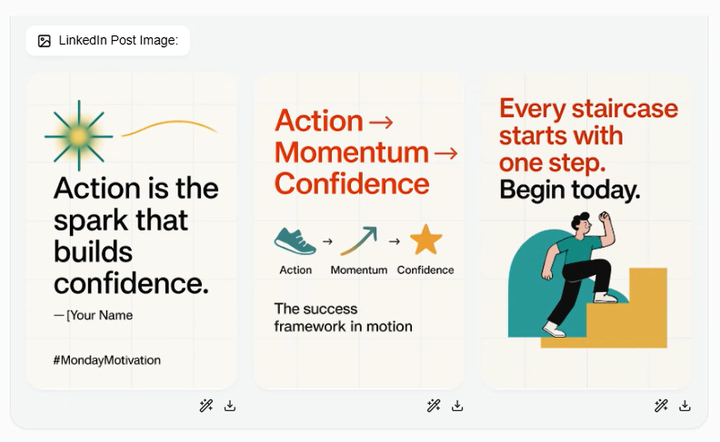
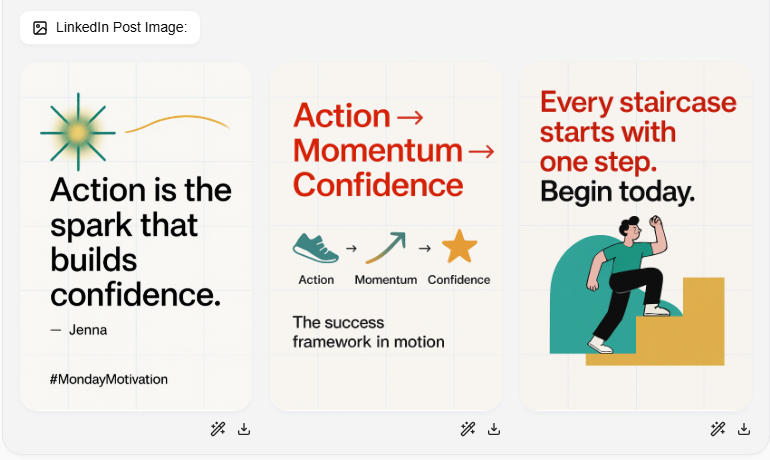
Firstly, I used the 'Magic Edit' feature to change 'Your Name' to 'Jenna'. I was pleasantly surprised that Dynal accomplished this correctly in a matter of seconds!
Next, I used 'Magic Eraser' to erase the additional bracket (I have no idea why it was there). Dynal completed this effortlessly as well. Now, all I had to do was download the post images and post them on LinkedIn! It was so much faster than designing the images myself and definitely cheaper than hiring a designer.
By the way, Dynal gave me a rewritten version of my LinkedIn post too:
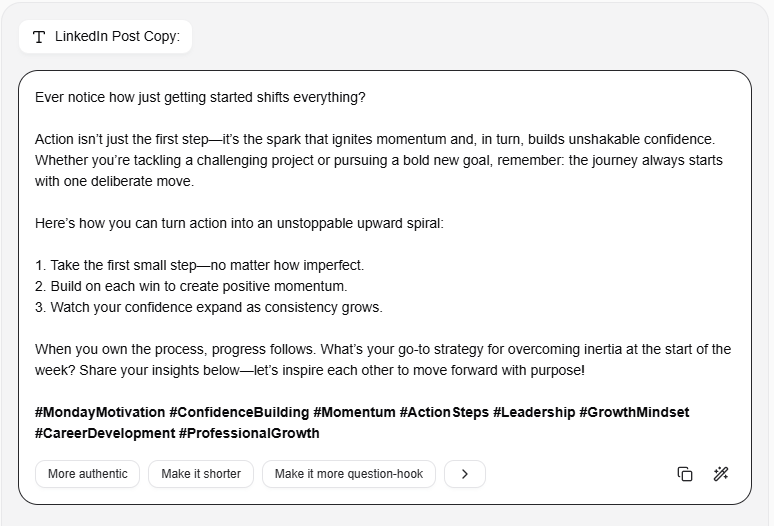
I particularly liked how Dynal kept the idea behind my words and added a question at the back to boost engagement from my audience! It also added more relevant hashtags so that more people could discover my post.
The Results
I shared the visuals alongside my post. Suddenly, people didn’t just read—they responded.
- Comments like, “This grabbed my attention—needed to see this today!”
- Shares from people who said the diagram finally made the idea click
- A request from a client to use the image in their team meeting
But most important? I saw my own message in a new light. My words finally had the energy and presence I’d always wanted.
What I Learned: You don’t have to be a designer to make your message visual. The right image can turn a good idea into something memorable—and shareable. And as always: the first step matters most.
If you’re a speaker or leader, I can’t recommend this enough. Dynal.AI made it easy for me to show up the way I want to be seen.
“Your message matters. Make it visible.” — Jenna R.
Note: This case study illustrates Jenna R.’s experience and shows how Dynal.AI helps thought leaders amplify their voice with visuals that connect. Names and details are anonymized for privacy.


