

Dynal.AI’s Calendar turns “I’ll post when I have time” into a visible weekly lineup of scheduled LinkedIn posts that publish automatically. It’s the simplest way to stay consistent without living in your notifications or remembering to hit “Post” every day.
The problem Calendar solves
Most people don’t struggle because they lack ideas. They struggle because publishing asks for attention at the exact right moment, over and over again. On a busy week, even a great draft can sit unfinished because the final step (choosing a time, posting manually, checking formatting) gets pushed to “later.”
That’s the gap the Calendar closes. Instead of treating posting as a daily decision, Dynal.AI turns it into a one-time planning action: schedule everything ahead of time, see your week at a glance, and let the content go out automatically.
What the Calendar is (and what it isn’t)
Dynal.AI Calendar is a weekly view of your LinkedIn publishing schedule, designed to make content feel concrete and manageable. It’s where drafts become commitments: each post gets a specific date and time, then publishes automatically so you can stay consistent even when you’re busy.
It’s not meant to replace your strategy or your voice. Dynal is built to keep you in the driver’s seat with full editing control and drafts that still sound like you, while the Calendar handles the operational work of getting posts out on time.
Why scheduling is the difference between “content” and “consistency”
Consistency isn’t about working harder. It’s about removing the daily friction that makes you drop the habit. Dynal.AI’s scheduling flow is built around exactly that: write, refine, and schedule posts ahead of time so they publish automatically, protecting your consistency when life gets chaotic.
When you can see your week laid out, you stop guessing. You can quickly tell whether you’re posting too much, too little, or clustering similar topics together. That clarity turns content from a stressful “should” into a simple weekly system.
Who the Calendar is for
Dynal.AI was built for professionals who want to share ideas and grow on LinkedIn without letting posting consume their day. The Calendar feature is especially valuable for a few common situations:
- Founders and operators with fragmented time who need posting to happen even during meetings, travel, and deep work blocks.
- Creators and builders growing a personal brand who want a predictable weekly cadence instead of sporadic bursts.
- Sales and client-facing professionals who want to stay top-of-mind while spending their energy on conversations, not content logistics.
- Agencies and social media managers who handle multiple profiles and need one place to manage publishing workflows.
How it works: from drafts to a scheduled week
Step 1: Build your posts
Dynal.AI is designed to eliminate the friction of content creation by turning raw inputs into polished LinkedIn posts, while learning your tone so the output feels authentic. You can start from materials you already have: PDFs, documents, images, videos, or even links, and Dynal extracts insights and reshapes them into LinkedIn-formatted drafts. The result is ready-to-post content you can still edit freely, without starting from a blank page.
Step 2: Schedule posts ahead of time
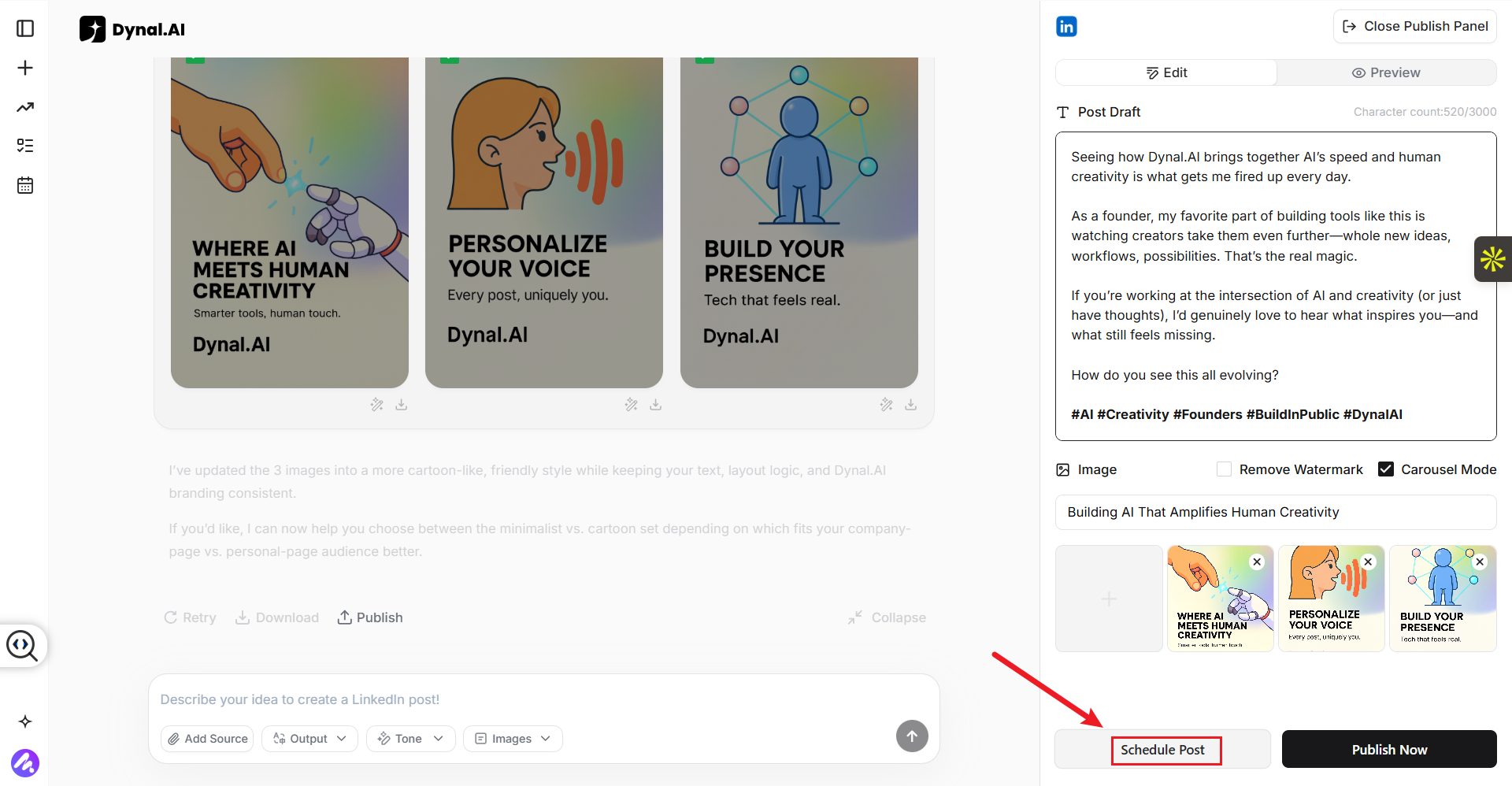
Once your drafts are ready, simply hit 'Schedule Post'. A calendar will pop up where you can select the exact time you want your post to be released.
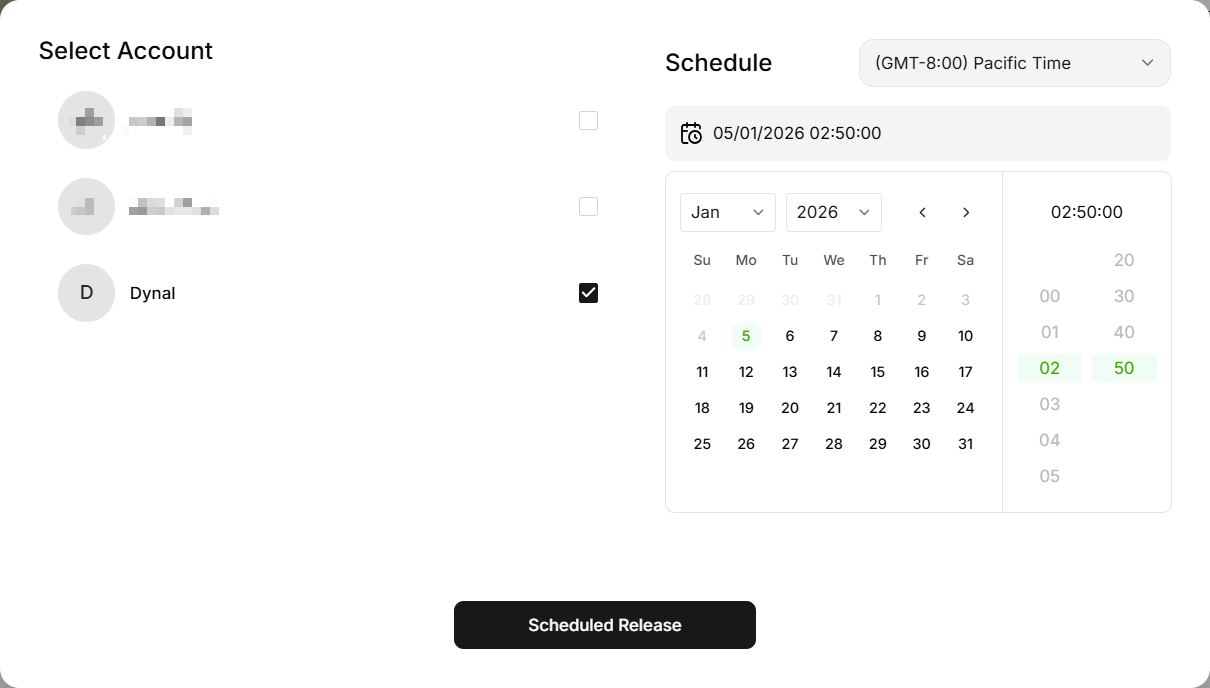
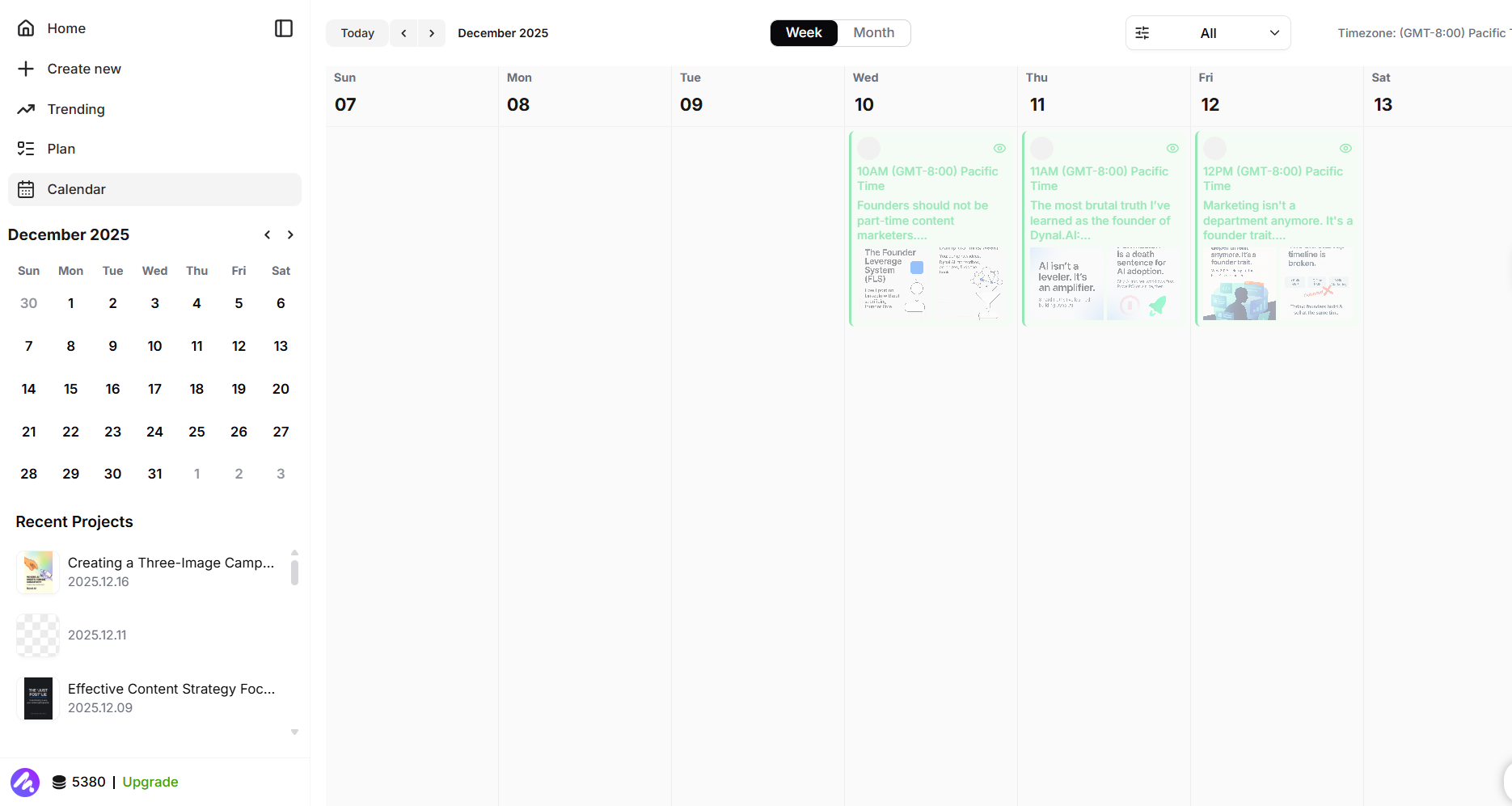
After that, navigate back to the Calendar view to see your week's content all in one place. Dynal’s scheduling capability is meant to help you write, refine, and schedule ahead of time so posts publish automatically, ensuring you stay consistent even when you’re busy.
Step 3: See your week at a glance
This is the part most tools miss: it’s not only about automation, it’s about visibility. Dynal’s planning and scheduling is positioned as turning abstract growth goals into a concrete calendar, which is exactly what the Calendar view delivers. When your week is visible, you can spot gaps and make quick adjustments before anything goes live.
Step 4: Publish automatically
After scheduling, the day-to-day pressure disappears. The work is done upfront, and your posts go out on schedule automatically. That means you can focus on what actually moves your LinkedIn growth: engaging with replies, starting conversations, and staying present, without needing to manually publish every time.
Real scenarios where Calendar shines
Scenario 1: The “busy week” buffer
You have a packed week: deadlines, classes, meetings, or travel. Posting manually becomes unrealistic, even if the drafts are ready. The Calendar solves this by letting you schedule content ahead of time so your presence continues without extra effort during the week.
Scenario 2: The “batch once, relax” workflow
Some people work best in bursts. On Sunday night or Monday morning, they want to create content in one focused session. Dynal’s workflow supports this by enabling you to prepare posts and auto-schedule them, so the rest of the week doesn’t require daily publishing decisions.
Scenario 3: The “stay consistent without overthinking” cadence
When posting is manual, each day becomes a mini negotiation: “Should I post today?” “Is this the right time?” “Do I have the energy?” The Calendar turns that into one decision per week, because the schedule is already set and visible.
Scenario 4: Multi-account and team workflows
If you manage more than one LinkedIn presence, publishing becomes even more operational. Dynal supports multi-account management through a unified dashboard so agencies or serial builders can manage multiple profiles in one place, which makes scheduled calendars far easier to coordinate.
Outcome
- Less mental load: scheduling ahead removes the daily “don’t forget to post” stress.
- More consistency: auto-scheduling helps you stay visible even when you’re busy.
- A clearer weekly rhythm: a calendar view turns your content into a plan you can see and adjust.
- More time for engagement: when publishing is automated, your energy can go into replies and relationships instead of logistics.
Try this: schedule just one week of posts in Dynal.AI Calendar, then spend the week focusing on conversations instead of posting logistics. If you can open your Calendar and see your week ready, you’ve already won back time and consistency.


