

You’ve crafted stunning content and customized every detail—now it’s time to make your LinkedIn post shine in the real world. With Dynal.AI, publishing is more than just a click: you can preview exactly how your content will look, optimize for engagement, and publish (or schedule) directly to LinkedIn, all while staying in control. Here’s how to get the most out of your final steps before going live.
Table of Contents
- Why Preview and Optimization Matter
- Step 1: Preview Your LinkedIn Post
- Step 2: Last-Minute Edits & Enhancements
- Step 3: Use Dynal.AI’s Optimization Tools
- Step 4: Publish, Schedule, or Download
- Step 5: Track Results and Iterate
- Pro Tips for Maximum Impact
- Next Steps
Why Preview and Optimization Matter
Before your content goes live, it’s crucial to see it exactly as your audience will. Small tweaks can make a big difference in engagement, clarity, and professionalism. Dynal.AI’s preview and optimization features give you:
- 100% confidence in your post’s appearance and message
- A chance to fix typos, polish visuals, or adjust hashtags
- Actionable AI tips to maximize reach and impact
Step 1: Preview Your LinkedIn Post
- See exactly how your carousel, images, or text posts will display on LinkedIn
- Check text spacing, font size, and image clarity
- Ensure hashtags and mentions are correct
Before publishing, use the preview function to see exactly how your post will appear in LinkedIn feeds. Click on the 'Publish to LinkedIn' button:
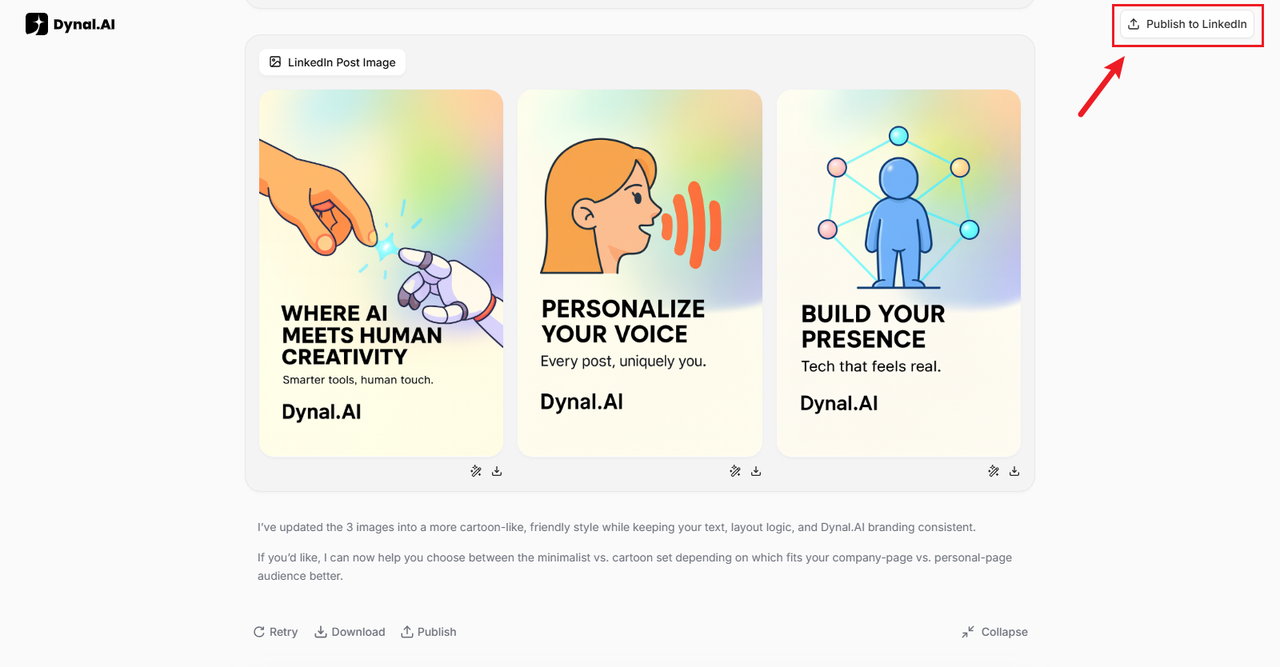
A side panel will then pop up. You can choose to upload the generated draft or directly paste your own.
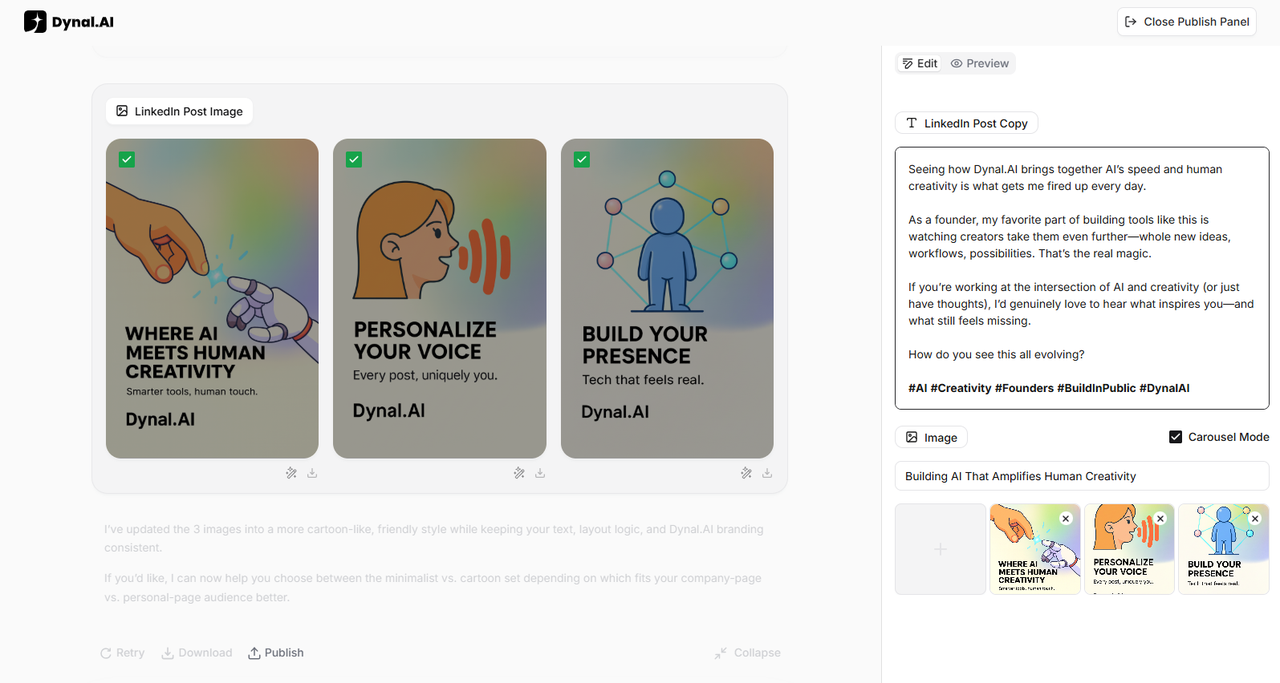
You can enable Carousel Mode to convert your images into PDF format! This format is great for informational visuals with text - your followers can easily swipe to view the photos and download the whole PDF file conveniently without changing the order of the slides.
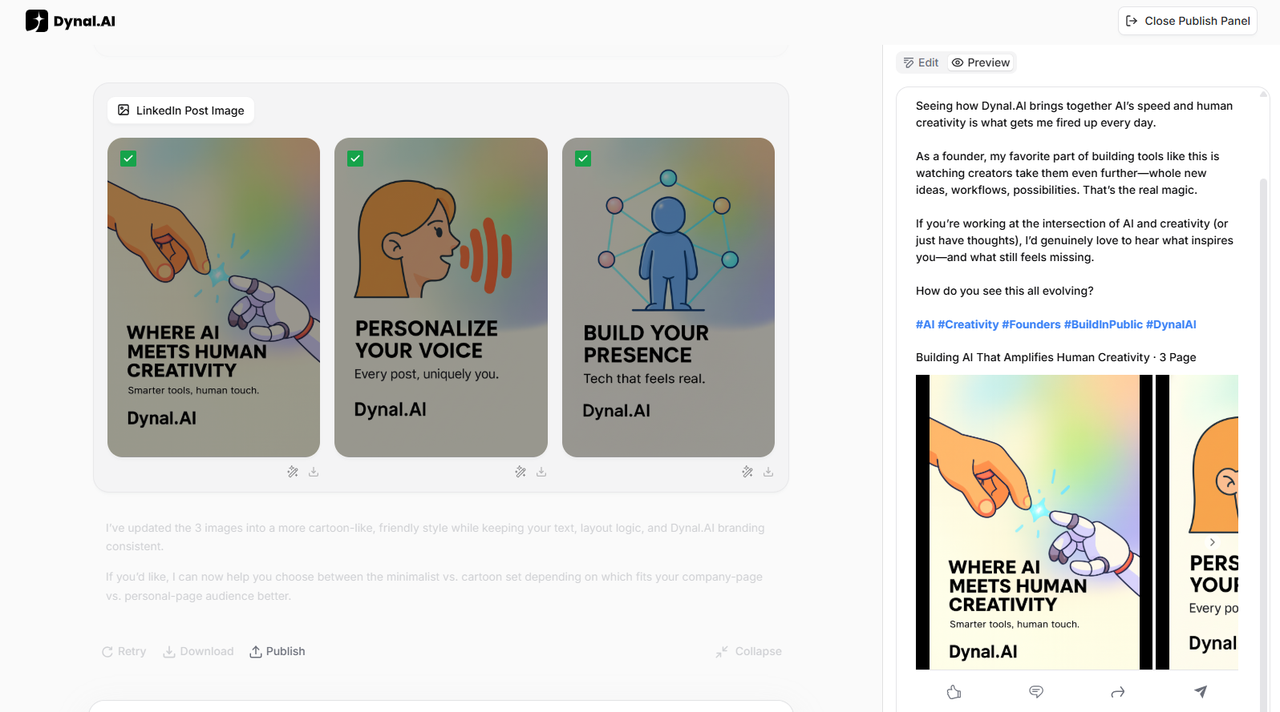
Switch to the Preview tab to check image placement, text formatting, and link previews to ensure everything looks professional and polished.
When you're satisfied with your content, publish directly to LinkedIn with a single click by hitting the 'Publish' button. Dynal.AI handles all technical aspects of posting, ensuring your content displays correctly and reaches your audience instantly.
Step 2: Last-Minute Edits & Enhancements
Did you spot a typo or want to tweak your message? Dynal.AI makes last-minute changes effortless.
- Edit text directly in the text box.
- Swap images, adjust slide order and change design elements simply by prompting Dynal.AI with your requirements.
- Use the Magic Edit, Magic Erase and Expand features to quickly rewrite text, adjust slide layouts, or resize your carousel for any platform.
Step 4: Publish, Schedule, or Download
Ready to go live? Dynal.AI offers flexible publishing options:
- Publish instantly to your LinkedIn profile or company page with a single click
- Plan beforehand and schedule your post for optimal timing—reach your audience when they’re most active
- Download your images or videos to post manually or use on other platforms (Instagram, Twitter, etc.). Dynal.AI allows you to download your images as separate files or as a single PDF based on your needs.
Step 5: Track Results and Iterate
Publishing a great post is just the beginning—the real growth comes from learning what works and evolving your content strategy over time. Dynal.AI makes it easy to track your results, compare different formats, and use data-driven insights to improve with every post.
How to Track Your Results
- Access Analytics: After publishing, head to your LinkedIn analytics to monitor key metrics for each post:
- Views: How many people saw your content.
- Likes & Reactions: A quick measure of appeal.
- Comments: Indicates deeper engagement or conversation starters.
- Shares: Shows that your content is valuable enough to pass along.
- Monitor Over Time: Check your post performance after 24 hours, 3 days, and 1 week. Sometimes engagement grows steadily as your network sees and shares your content.
Compare Formats to Find Your Winners
- Carousel vs. Video vs. Static Image: Use Dynal.AI’s analytics to see which content formats get the most interaction.
- Carousels are great for storytelling and step-by-step guides.
- Videos often attract more attention and are shared more frequently.
- Single Images can be powerful for quick, visual messages.
- Experiment and Track: Try sharing the same message in different formats over time, then compare:
- Which style gets the most comments or shares?
- Did a video outperform a carousel on the same topic?
- Is your audience more responsive to certain visual styles or headlines?
Iterate and Double Down on What Works
- Analyze your data: Analyze your best-performing posts for:
- Headline styles that generated more clicks.
- Hashtag combinations that boosted visibility.
- Visual themes or color palettes that resonated most.
- Refine Your Strategy:
- Save your top-performing templates for future posts.
- Schedule posts at the times your analytics show the highest engagement.
- Continuous Improvement:
- At the end of each month, review your analytics dashboard for trends.
- Set small goals for your next batch of posts—such as increasing comments or shares by 10%.
- Don’t be afraid to try new approaches and compare the results!
Example Workflow
- Review analytics for your last 5 posts.
- Identify the top 2 by engagement (likes, comments, shares).
- Analyze what made them successful (topic, format, posting time, visual style).
- Plan your next 3 posts to use similar strategies, tweaking one variable at a time.
- Repeat the process, building your own data-driven playbook for LinkedIn success.
By consistently tracking, comparing, and iterating, you’ll not only grow your LinkedIn presence—you’ll turn every post into a learning opportunity and a step toward even better results.
Mastering Dynal.AI: Pro Tips, FAQs, and Your Next Steps
Congratulations! You’ve completed your first content journey with Dynal.AI. Whether you’re a LinkedIn newbie or a seasoned creator, you now have the tools to craft stunning, high-impact posts with powerful AI support. Ready to level up? This guide is your go-to for advanced editing, power user shortcuts, expert best practices, and answers to the most common questions—plus a look at what’s coming next.
Best Practices for LinkedIn Influence
Want to maximize your reach and engagement? Try these proven strategies:
- Consistent Posting
Aim for 2-3 posts per week. Consistency builds visibility and trust with your audience.
- Perfect Timing
Schedule posts for when your audience is most active (e.g., weekday mornings or lunch hours). Generally, weekday mornings (10am -12pm) and early afternoon (12pm - 2pm) work best, but feel free to try out different timings to find out what works for you!
- Engage Authentically
Respond to comments, ask questions, and participate in relevant conversations to grow your network.
- Track Your Results
Use LinkedIn’s stats to monitor views, likes, and shares. Test different content types (carousels, videos) and double down on what works.
Common Questions & Troubleshooting
Q: Why won’t my file upload?
A: Check file type and size limits. Dynal.AI supports PDFs, images, and text—try re-uploading or refreshing the page.
Q: How do I edit a single carousel slide?
A: Click directly on the slide in the preview. Use “Magic Edit” for text or image tweaks without changing the whole post.
Q: Can I use custom brand colors and fonts?
A: Yes! Simply specify your brand colors and fonts clearly in your prompt and Dynal.AI will handle the rest.
Q: I accidentally deleted something. Is there version history? A: Yes, all versions are saved in the chat history! You don't have to worry about losing previous versions.
More questions? Visit the Help Center or contact us via email at support@Dynal.AI.
Continuous Learning with Dynal.AI
Dynal.AI is more than a tool—it’s your ongoing creative partner:
- Explainable AI
Every recommendation and change comes with a clear explanation, so you can learn what works and why.
- Intelligent Feedback
Dynal.AI analyzes your results and offers tips to improve every post you create.
- Personalized Growth
The more you use Dynal.AI, the smarter and more tailored your experience becomes.
User Stories & Testimonials
“I used Dynal.AI to launch my product updates—it saved hours each week and doubled my engagement!” — Alex, SaaS Founder“
The carousel and video features helped me build a strong personal brand fast.” — Priya, Marketing Consultant
(Have a story to share? Send us your testimonial!)
Join the Community & Share Your Feedback
You’re invited!
- Join our Dynal.AI Community for tips, inspiration, and live events.
- Share your feedback to help us improve.
- Watch for upcoming webinars and advanced workshops.
What’s Next on Dynal.AI
We’re always building new features to help you grow:
- Upcoming: Team collaboration tools, advanced analytics, more video styles, and enhanced automation.
- Have a feature request? Let us know!
Stay tuned for product updates and exciting roadmap news.
Final Call to Action
Ready for your next win?
- Start a new project now, or try an advanced feature you haven’t explored yet.
- Share your favorite post, leave a comment, or invite a friend to Dynal.AI!


